# CloudIO Platform

The CloudIO platform is a comprehensive application development suite that enables the efficient construction of applications tailored to meet specific business needs, often with minimal or no coding required.&#x20;

Utilize the platform to create a data model, design a user interface, and define behavior for individual elements of the application. Customize component behavior using minimal coding

Key features of the CloudIO platform include:

* **Zero/minimal coding**: easily extendable UI that connects to any database (on-premise/cloud) in real time.
* **Pre-built connectors**: connect to popular data sources and cloud applications such as Oracle EBS/Cloud and Salesforce.
* **User-friendly interface**: organize your application building process using the CloudIO platform's visual environment, where you can drag and drop application components and define their properties.
* **Real-time Features**: Implement real-time features in your application using the built-in components and APIs, allowing for instant updates and notifications to be sent to users in real time.
* **Cloud Functions**: Execute custom code on cloud servers in response to events triggered by the platform or external business events.
* **Workflow**: Define and manage the workflow of your business processes within the application using the built-in workflow engine.
* **Test automation**: Automate testing of your application through Test Automation. Utilize pre-built test scripts, create test scripts by recording user flows, and tailor them to meet specific business requirements.
* **Data Migration and Stream Processing**: Effortlessly migrate data from various sources and perform real-time stream processing to extract insights and take actions on the data in near real-time.
* **Instant Hot Deployment**: Effortlessly deploy your applications to various cloud environments with minimal clicks or via the command line interface without interrupting your instance.

![Designer View in Dark Mode](/files/-MavkqiQX8rOakHxL2X5)

![UI Page Designer](/files/-Mavl2HH6NEy8vaJSAQY)

![Workflow Designer](/files/-Mavm8IVuFRm6Nn72qEX)

![Cloud Functions Code Editor](/files/-Mb9y1na9WjjcY5PAifu)


# Architecture

Modern Scalable Architecture

![CloudIO Platform Architectural Components](/files/-Mb8ZKlpn4LR-wI6ky1h)

## Technology Components

CloudIO Platform 4.0 is written from scratch for serverless deployments using modern scalable technologies.

### Database

All the platform metadata and the application data are persisted in a MySQL database. We are planning to add support for Oracle, MS SQL Server, DB2 & PostgreSQL within the next few months.

### RUST

The core of the platform is written in RUST. All the database interaction, transactions, workflow orchestration, job scheduling, cloud functions (javascript), and push notifications are all implemented in RUST.

### Distributed Cache

Redis is used for distributed caching

### User Interface

The user interface is built using ReactJS

### Cloud Functions

Business functionality can be extended on the server side using modern Javascript (ES2020) that runs on a secure sandboxed environment using QuickJS that is embedded within RUST.

### Microservices

3rd party integrations can be plugged in using microservices built on any language of choice as long as the service can expose either a REST endpoint or can consume a Kafka topic.

## Deployment

The platform can be deployed either on-premise or on the public/private cloud. The entire platform with all the components can be run inside a Docker container.

## Performance

The central component of the architecture is the CloudIO Server component that's written in Rust and can run start in less than 20 ms & consumes around 20 MB memory compared to about a few seconds and a few hundred MB memory for the previous Java-based architecture. At peak loads (load test with 1000 concurrent requests) the memory consumption was about 120 MB compared to 2GB+ memory.

### Instant Startup \~ 20 ms

![CloudIO Platform Startup Log](/files/-Mb5bFFiEcBJVNao-TDz)

### Low Memory Footprint \~ 20 MB

![Docker Stats after 100K+ requests consuming a few GBs of network IO](/files/-MbDWFV9i-14I04vOFK7)


# Service Architecture

## System Design

![CloudIO System Design](/files/gK29J2mtKk0Z2jUUWLHo)

## Service Architecture

![CloudIO Service Architecture](/files/6CllJglU8z1PPywNPOsw)

### Page

Construct complex UI without writing a single line of code using the Page Designer and our 380+ out-of-the-box components and actions. Pages contain metadata about UI controls and layouts and associated triggers and actions. For example, button labels and acts to perform on button clicks.

![Page Designer](/files/pFg16EtQn8pilhsGftgJ)

**Real-time Analysis & Auto Fix Suggestions**

Analyze and validate pages in real-time as you work on them, receive suggestions for fixes and easily apply them with a single click.

![Page Analysis Popup](/files/ziXRQFYW7JIeFWv6YfAw)

**Collaborative Development**

Facilitate real-time collaboration during the development of a page. Let functional users access the same page, track changes, and provide immediate feedback to the page creator and developer.

**Change History**

Track every update made to a page through built-in versioning and auditing. Easily access all previous changes and restore to any earlier version with minimal clicks.

![Difference between the two selected versions](/files/TvAlz7oTwQNCR8c4JM8x)

### Custom Components

Create your own React Component using the MUI Component library if you cannot find what you need among the existing 380+ components and actions. Use custom components in the Page Designer just like standard components, with built-in version management and change history. Install specific versions in one application and different versions in another application.

![Component Store](/files/45MXadrBozsvX5nR9rGw)

### DataSource

A metadata layer that sits between the source object (Database tables, Cloud systems APIs) and UI components. The UI components interact with the source object through the DataSource. It contains all field information about the source object and allows for extended functionality through scripting. DataSource handles CRUD operations against database tables seamlessly without any coding. Enhance business functionality by adding filters before fetching data and validations before posting any changes from the user by using modern ES2020 javascript.

### External DataSource

Transform the DataSource filters and data from CloudIO's structure into the external Cloud System's structure, such as Salesforce, by using External DataSource.

![Sample External DataSource for CosmosDB](/files/BeSKAw3VBiJwC1o4FBWc)

### Cloud DataSource

Utilize Cloud DataSource to integrate any simple REST API without the complexity of using External DataSource.

![](/files/TYY5rhdhkTHQmDLTbROu)

### Cloud Functions

Small code units that can be invoked from the UI or scheduled to run at a given interval or at a specific day and time using CRON expression. Create Cloud Functions as reusable modules imported into other functions or used in the backend through scripting such as Workflows, DataSources, etc.

![Cloud Function Definition](/files/TOWtAbx93iDkbddTjTky)

### Test Automation

With the built-in test automation framework, you can record all the UI interactions (clicks & data entry) and replay on demand or scheduled.

<figure><img src="/files/1MBfg6GrAnffn3IdcmR4" alt=""><figcaption><p>Test Automation In Action</p></figcaption></figure>

#### Sample Test Script Used for the above Test Automation

{% code overflow="wrap" lineNumbers="true" %}

```javascript
const tableName = "TEST_AUTOMATION";
const dataSourceName = 'TestAutomation';

test("UI Test", async () => {

  // Page
  await ui.page('cloudio.home');
  await ui.click({ testid: '$sidebar$-ds' });
  await ui.click({ testid: 'action' });
  await ui.click({ testid: 'io-wo-blank' });
  await ui.type('io-ds-name-input', dataSourceName);
  await ui.type('io-table-name-input', tableName);
  await ui.click({ testid: 'io-readonly-input' });
  await ui.click({ testid: 'io-skipQueryForUpdate-input' });
  await ui.click({ testid: 'action' });
  await ui.hasNotified((msg) => msg === `DataSource ${dataSourceName} created successfully!`);
  ui.close();
  await ui.click({ testid: 'io-wo-attr' });
  await ui.click({ testid: 'action' });
  await ui.type('io-columnName-input', 'COLUMN_1');
  await ui.click({ testid: 'io-allowBlank-input' });
  await ui.click({ testid: 'action' });
  await ui.hasNotified((msg) => msg === 'Field Column 1 created successfully!');
  ui.close();
  await ui.click({ testid: 'io-columnName-input' });
  await ui.type('io-columnName-input', 'NUMBER_COLUMN_1');
  await ui.click({ testid: 'attributeType-Integer' });
  await ui.click({ testid: 'io-allowBlank-input' });
  await ui.click({ testid: 'action' });
  await ui.hasNotified((msg) => msg === 'Field Number Column 1 created successfully!');
  ui.close();
  await ui.click({ testid: 'back' });
  await ui.click({ testid: 'back' });
  await ui.click({ testid: dataSourceName + '-more' });
  await ui.click({ testid: dataSourceName + '-access' });
  await ui.click({ testid: 'datasource-access-uncheckall-administrator', force: true });
  await ui.wait(300);
  await ui.click({ testid: 'datasource-access-uncheckall-developer', force: true });
  await ui.wait(300);
  await ui.click({ testid: 'save' });
  await ui.hasNotified((msg) => msg === '2 DataSource Access updated successfully!');
  await ui.click({ testid: dataSourceName + '-more' });
  await ui.click({ testid: dataSourceName + '-delete' });
  await ui.click({ testid: 'confirm-yes' });
  await ui.hasNotified((msg) => msg === `DataSource '${dataSourceName}' deleted successfully!`);
  await ui.click({ testid: 'clearall-notifications' });
});

afterAll(async () => {
  await executeUpdate(`DROP TABLE ${tableName};`);
});
```

{% endcode %}

### On-Premise Agent

On-Premise Agents can be used to connect to the data within your corporate firewall securely without having to open any inbound port through the firewall.

### Other Services

#### Blob Storage

There is built-in integration with Azure Blob Storage & AWS S3 Storage service. You can configure the Storage of your choice at the Application level. Various processes like File Uploads, CSV Import, and Patch Uploads use the configured Storage for processing and storing BLOB data.

#### CSV Export / Import

Data displayed on the UI, e.g., Data Grid, can be exported in CSV format. Also, use an existing CSV file to import and auto-generate a DataSource (with a backing database table) based on the CSV data.

#### Email / Messaging

The platform provides built-in APIs for sending emails and posting messages to Microsoft Teams, Slack & Facebook Workplace.

#### Data Encryption

You can keep the sensitive part of your application data encrypted. By simply choosing the field attribute type as `Encrypted String`, the platform will take care of encrypting the data while storing in the source database or cloud system and decrypt it before displaying the data to the user on the UI. You can also do the same on demand using the built-in APIs.

#### File Attachment

You can use the built-in File Attachment component to upload files with inbuilt versioning support. This service uses the configured Blob Storage service to store the files in either Azure Blob or S3.

#### Health Check

## Prometheus Metrics that can be fed into your existing monitoring system for Health Checks & Alerts.

<mark style="color:blue;">`GET`</mark> `/v1/metrics`

{% tabs %}
{% tab title="200: OK " %}

```javascript
# HELP io_api_request_duration_seconds The API request latencies in seconds.
# TYPE io_api_request_duration_seconds histogram
io_api_request_duration_seconds_bucket{app="cloudio",instance_id="dev_rust",org="cloudio",statuscode="200",le="0.005"} 10
io_api_request_duration_seconds_bucket{app="cloudio",instance_id="dev_rust",org="cloudio",statuscode="200",le="0.01"} 10
io_api_request_duration_seconds_bucket{app="cloudio",instance_id="dev_rust",org="cloudio",statuscode="200",le="0.025"} 10
io_api_request_duration_seconds_bucket{app="cloudio",instance_id="dev_rust",org="cloudio",statuscode="200",le="0.05"} 10
io_api_request_duration_seconds_bucket{app="cloudio",instance_id="dev_rust",org="cloudio",statuscode="200",le="0.1"} 10
io_api_request_duration_seconds_bucket{app="cloudio",instance_id="dev_rust",org="cloudio",statuscode="200",le="0.25"} 10
io_api_request_duration_seconds_bucket{app="cloudio",instance_id="dev_rust",org="cloudio",statuscode="200",le="0.5"} 10
io_api_request_duration_seconds_bucket{app="cloudio",instance_id="dev_rust",org="cloudio",statuscode="200",le="1"} 10
io_api_request_duration_seconds_bucket{app="cloudio",instance_id="dev_rust",org="cloudio",statuscode="200",le="2.5"} 10
io_api_request_duration_seconds_bucket{app="cloudio",instance_id="dev_rust",org="cloudio",statuscode="200",le="5"} 10
io_api_request_duration_seconds_bucket{app="cloudio",instance_id="dev_rust",org="cloudio",statuscode="200",le="10"} 10
io_api_request_duration_seconds_bucket{app="cloudio",instance_id="dev_rust",org="cloudio",statuscode="200",le="+Inf"} 10
io_api_request_duration_seconds_sum{app="cloudio",instance_id="dev_rust",org="cloudio",statuscode="200"} 0.046232549
io_api_request_duration_seconds_count{app="cloudio",instance_id="dev_rust",org="cloudio",statuscode="200"} 10
# HELP io_api_requests_total Number of API requests made.
# TYPE io_api_requests_total counter
io_api_requests_total{app="cloudio",instance_id="dev_rust",org="cloudio"} 10
# HELP io_api_response_size_bytes The API response sizes in bytes.
# TYPE io_api_response_size_bytes histogram
io_api_response_size_bytes_bucket{app="cloudio",instance_id="dev_rust",org="cloudio",le="1024"} 0
io_api_response_size_bytes_bucket{app="cloudio",instance_id="dev_rust",org="cloudio",le="5120"} 0
io_api_response_size_bytes_bucket{app="cloudio",instance_id="dev_rust",org="cloudio",le="10240"} 0
io_api_response_size_bytes_bucket{app="cloudio",instance_id="dev_rust",org="cloudio",le="25600"} 0
io_api_response_size_bytes_bucket{app="cloudio",instance_id="dev_rust",org="cloudio",le="51200"} 10
io_api_response_size_bytes_bucket{app="cloudio",instance_id="dev_rust",org="cloudio",le="102400"} 10
io_api_response_size_bytes_bucket{app="cloudio",instance_id="dev_rust",org="cloudio",le="1024000"} 10
io_api_response_size_bytes_bucket{app="cloudio",instance_id="dev_rust",org="cloudio",le="10240000"} 10
io_api_response_size_bytes_bucket{app="cloudio",instance_id="dev_rust",org="cloudio",le="+Inf"} 10
io_api_response_size_bytes_sum{app="cloudio",instance_id="dev_rust",org="cloudio"} 361630
io_api_response_size_bytes_count{app="cloudio",instance_id="dev_rust",org="cloudio"} 10
# HELP io_db_active_connections The active database connection size
# TYPE io_db_active_connections gauge
io_db_active_connections{app="cloudio",instance_id="dev_rust",org="cloudio",readonly="false"} 0
io_db_active_connections{app="cloudio",instance_id="dev_rust",org="cloudio",readonly="true"} 0
io_db_active_connections{app="hsbc-baa-s",instance_id="dev_rust",org="cloudio",readonly="false"} 0
io_db_active_connections{app="hsbc-baa-s",instance_id="dev_rust",org="cloudio",readonly="true"} 0
io_db_active_connections{app="my-application",instance_id="dev_rust",org="cloudio",readonly="false"} 0
io_db_active_connections{app="pr",instance_id="dev_rust",org="cloudio",readonly="false"} 0
io_db_active_connections{app="spaces",instance_id="dev_rust",org="cloudio",readonly="false"} 0
io_db_active_connections{app="ticketing-system-4-0",instance_id="dev_rust",org="cloudio",readonly="false"} 0
io_db_active_connections{app="xcelerateiot",instance_id="dev_rust",org="cloudio",readonly="false"} 0
# HELP io_index_html_requests_total Number of index.html requests made.
# TYPE io_index_html_requests_total counter
io_index_html_requests_total{instance_id="dev_rust",org="cloudio"} 35
# HELP io_ws_active_sessions The active websocket connection size
# TYPE io_ws_active_sessions gauge
io_ws_active_sessions{instance_id="dev_rust",org="cloudio"} 2
# HELP io_ws_request_duration_seconds The websocket request latencies in seconds.
# TYPE io_ws_request_duration_seconds histogram
io_ws_request_duration_seconds_bucket{app="cloudio",instance_id="dev_rust",org="cloudio",statuscode="200",le="0.005"} 0
io_ws_request_duration_seconds_bucket{app="cloudio",instance_id="dev_rust",org="cloudio",statuscode="200",le="0.01"} 0
io_ws_request_duration_seconds_bucket{app="cloudio",instance_id="dev_rust",org="cloudio",statuscode="200",le="0.025"} 527
io_ws_request_duration_seconds_bucket{app="cloudio",instance_id="dev_rust",org="cloudio",statuscode="200",le="0.05"} 534
io_ws_request_duration_seconds_bucket{app="cloudio",instance_id="dev_rust",org="cloudio",statuscode="200",le="0.1"} 535
io_ws_request_duration_seconds_bucket{app="cloudio",instance_id="dev_rust",org="cloudio",statuscode="200",le="0.25"} 535
io_ws_request_duration_seconds_bucket{app="cloudio",instance_id="dev_rust",org="cloudio",statuscode="200",le="0.5"} 536
io_ws_request_duration_seconds_bucket{app="cloudio",instance_id="dev_rust",org="cloudio",statuscode="200",le="1"} 537
io_ws_request_duration_seconds_bucket{app="cloudio",instance_id="dev_rust",org="cloudio",statuscode="200",le="2.5"} 537
io_ws_request_duration_seconds_bucket{app="cloudio",instance_id="dev_rust",org="cloudio",statuscode="200",le="5"} 537
io_ws_request_duration_seconds_bucket{app="cloudio",instance_id="dev_rust",org="cloudio",statuscode="200",le="10"} 537
io_ws_request_duration_seconds_bucket{app="cloudio",instance_id="dev_rust",org="cloudio",statuscode="200",le="+Inf"} 537
io_ws_request_duration_seconds_sum{app="cloudio",instance_id="dev_rust",org="cloudio",statuscode="200"} 10.531006300999998
io_ws_request_duration_seconds_count{app="cloudio",instance_id="dev_rust",org="cloudio",statuscode="200"} 537
io_ws_request_duration_seconds_bucket{app="cloudio",instance_id="dev_rust",org="cloudio",statuscode="400",le="0.005"} 0
io_ws_request_duration_seconds_bucket{app="cloudio",instance_id="dev_rust",org="cloudio",statuscode="400",le="0.01"} 0
io_ws_request_duration_seconds_bucket{app="cloudio",instance_id="dev_rust",org="cloudio",statuscode="400",le="0.025"} 2
io_ws_request_duration_seconds_bucket{app="cloudio",instance_id="dev_rust",org="cloudio",statuscode="400",le="0.05"} 2
io_ws_request_duration_seconds_bucket{app="cloudio",instance_id="dev_rust",org="cloudio",statuscode="400",le="0.1"} 2
io_ws_request_duration_seconds_bucket{app="cloudio",instance_id="dev_rust",org="cloudio",statuscode="400",le="0.25"} 2
io_ws_request_duration_seconds_bucket{app="cloudio",instance_id="dev_rust",org="cloudio",statuscode="400",le="0.5"} 2
io_ws_request_duration_seconds_bucket{app="cloudio",instance_id="dev_rust",org="cloudio",statuscode="400",le="1"} 2
io_ws_request_duration_seconds_bucket{app="cloudio",instance_id="dev_rust",org="cloudio",statuscode="400",le="2.5"} 2
io_ws_request_duration_seconds_bucket{app="cloudio",instance_id="dev_rust",org="cloudio",statuscode="400",le="5"} 2
io_ws_request_duration_seconds_bucket{app="cloudio",instance_id="dev_rust",org="cloudio",statuscode="400",le="10"} 2
io_ws_request_duration_seconds_bucket{app="cloudio",instance_id="dev_rust",org="cloudio",statuscode="400",le="+Inf"} 2
io_ws_request_duration_seconds_sum{app="cloudio",instance_id="dev_rust",org="cloudio",statuscode="400"} 0.030714902
io_ws_request_duration_seconds_count{app="cloudio",instance_id="dev_rust",org="cloudio",statuscode="400"} 2
io_ws_request_duration_seconds_bucket{app="hsbc-baa-s",instance_id="dev_rust",org="cloudio",statuscode="200",le="0.005"} 0
io_ws_request_duration_seconds_bucket{app="hsbc-baa-s",instance_id="dev_rust",org="cloudio",statuscode="200",le="0.01"} 0
io_ws_request_duration_seconds_bucket{app="hsbc-baa-s",instance_id="dev_rust",org="cloudio",statuscode="200",le="0.025"} 26
io_ws_request_duration_seconds_bucket{app="hsbc-baa-s",instance_id="dev_rust",org="cloudio",statuscode="200",le="0.05"} 31
io_ws_request_duration_seconds_bucket{app="hsbc-baa-s",instance_id="dev_rust",org="cloudio",statuscode="200",le="0.1"} 31
io_ws_request_duration_seconds_bucket{app="hsbc-baa-s",instance_id="dev_rust",org="cloudio",statuscode="200",le="0.25"} 31
io_ws_request_duration_seconds_bucket{app="hsbc-baa-s",instance_id="dev_rust",org="cloudio",statuscode="200",le="0.5"} 31
io_ws_request_duration_seconds_bucket{app="hsbc-baa-s",instance_id="dev_rust",org="cloudio",statuscode="200",le="1"} 31
io_ws_request_duration_seconds_bucket{app="hsbc-baa-s",instance_id="dev_rust",org="cloudio",statuscode="200",le="2.5"} 31
io_ws_request_duration_seconds_bucket{app="hsbc-baa-s",instance_id="dev_rust",org="cloudio",statuscode="200",le="5"} 31
io_ws_request_duration_seconds_bucket{app="hsbc-baa-s",instance_id="dev_rust",org="cloudio",statuscode="200",le="10"} 31
io_ws_request_duration_seconds_bucket{app="hsbc-baa-s",instance_id="dev_rust",org="cloudio",statuscode="200",le="+Inf"} 31
io_ws_request_duration_seconds_sum{app="hsbc-baa-s",instance_id="dev_rust",org="cloudio",statuscode="200"} 0.575535969
io_ws_request_duration_seconds_count{app="hsbc-baa-s",instance_id="dev_rust",org="cloudio",statuscode="200"} 31
io_ws_request_duration_seconds_bucket{app="my-application",instance_id="dev_rust",org="cloudio",statuscode="200",le="0.005"} 0
io_ws_request_duration_seconds_bucket{app="my-application",instance_id="dev_rust",org="cloudio",statuscode="200",le="0.01"} 0
io_ws_request_duration_seconds_bucket{app="my-application",instance_id="dev_rust",org="cloudio",statuscode="200",le="0.025"} 37
io_ws_request_duration_seconds_bucket{app="my-application",instance_id="dev_rust",org="cloudio",statuscode="200",le="0.05"} 38
io_ws_request_duration_seconds_bucket{app="my-application",instance_id="dev_rust",org="cloudio",statuscode="200",le="0.1"} 40
io_ws_request_duration_seconds_bucket{app="my-application",instance_id="dev_rust",org="cloudio",statuscode="200",le="0.25"} 40
io_ws_request_duration_seconds_bucket{app="my-application",instance_id="dev_rust",org="cloudio",statuscode="200",le="0.5"} 40
io_ws_request_duration_seconds_bucket{app="my-application",instance_id="dev_rust",org="cloudio",statuscode="200",le="1"} 40
io_ws_request_duration_seconds_bucket{app="my-application",instance_id="dev_rust",org="cloudio",statuscode="200",le="2.5"} 40
io_ws_request_duration_seconds_bucket{app="my-application",instance_id="dev_rust",org="cloudio",statuscode="200",le="5"} 40
io_ws_request_duration_seconds_bucket{app="my-application",instance_id="dev_rust",org="cloudio",statuscode="200",le="10"} 40
io_ws_request_duration_seconds_bucket{app="my-application",instance_id="dev_rust",org="cloudio",statuscode="200",le="+Inf"} 40
io_ws_request_duration_seconds_sum{app="my-application",instance_id="dev_rust",org="cloudio",statuscode="200"} 0.8097220920000003
io_ws_request_duration_seconds_count{app="my-application",instance_id="dev_rust",org="cloudio",statuscode="200"} 40
io_ws_request_duration_seconds_bucket{app="pr",instance_id="dev_rust",org="cloudio",statuscode="200",le="0.005"} 0
io_ws_request_duration_seconds_bucket{app="pr",instance_id="dev_rust",org="cloudio",statuscode="200",le="0.01"} 0
io_ws_request_duration_seconds_bucket{app="pr",instance_id="dev_rust",org="cloudio",statuscode="200",le="0.025"} 654
io_ws_request_duration_seconds_bucket{app="pr",instance_id="dev_rust",org="cloudio",statuscode="200",le="0.05"} 666
io_ws_request_duration_seconds_bucket{app="pr",instance_id="dev_rust",org="cloudio",statuscode="200",le="0.1"} 668
io_ws_request_duration_seconds_bucket{app="pr",instance_id="dev_rust",org="cloudio",statuscode="200",le="0.25"} 668
io_ws_request_duration_seconds_bucket{app="pr",instance_id="dev_rust",org="cloudio",statuscode="200",le="0.5"} 668
io_ws_request_duration_seconds_bucket{app="pr",instance_id="dev_rust",org="cloudio",statuscode="200",le="1"} 668
io_ws_request_duration_seconds_bucket{app="pr",instance_id="dev_rust",org="cloudio",statuscode="200",le="2.5"} 668
io_ws_request_duration_seconds_bucket{app="pr",instance_id="dev_rust",org="cloudio",statuscode="200",le="5"} 668
io_ws_request_duration_seconds_bucket{app="pr",instance_id="dev_rust",org="cloudio",statuscode="200",le="10"} 668
io_ws_request_duration_seconds_bucket{app="pr",instance_id="dev_rust",org="cloudio",statuscode="200",le="+Inf"} 668
io_ws_request_duration_seconds_sum{app="pr",instance_id="dev_rust",org="cloudio",statuscode="200"} 11.492725862000007
io_ws_request_duration_seconds_count{app="pr",instance_id="dev_rust",org="cloudio",statuscode="200"} 668
io_ws_request_duration_seconds_bucket{app="spaces",instance_id="dev_rust",org="cloudio",statuscode="200",le="0.005"} 0
io_ws_request_duration_seconds_bucket{app="spaces",instance_id="dev_rust",org="cloudio",statuscode="200",le="0.01"} 0
io_ws_request_duration_seconds_bucket{app="spaces",instance_id="dev_rust",org="cloudio",statuscode="200",le="0.025"} 43
io_ws_request_duration_seconds_bucket{app="spaces",instance_id="dev_rust",org="cloudio",statuscode="200",le="0.05"} 44
io_ws_request_duration_seconds_bucket{app="spaces",instance_id="dev_rust",org="cloudio",statuscode="200",le="0.1"} 44
io_ws_request_duration_seconds_bucket{app="spaces",instance_id="dev_rust",org="cloudio",statuscode="200",le="0.25"} 44
io_ws_request_duration_seconds_bucket{app="spaces",instance_id="dev_rust",org="cloudio",statuscode="200",le="0.5"} 44
io_ws_request_duration_seconds_bucket{app="spaces",instance_id="dev_rust",org="cloudio",statuscode="200",le="1"} 44
io_ws_request_duration_seconds_bucket{app="spaces",instance_id="dev_rust",org="cloudio",statuscode="200",le="2.5"} 44
io_ws_request_duration_seconds_bucket{app="spaces",instance_id="dev_rust",org="cloudio",statuscode="200",le="5"} 44
io_ws_request_duration_seconds_bucket{app="spaces",instance_id="dev_rust",org="cloudio",statuscode="200",le="10"} 44
io_ws_request_duration_seconds_bucket{app="spaces",instance_id="dev_rust",org="cloudio",statuscode="200",le="+Inf"} 44
io_ws_request_duration_seconds_sum{app="spaces",instance_id="dev_rust",org="cloudio",statuscode="200"} 0.7740629250000002
io_ws_request_duration_seconds_count{app="spaces",instance_id="dev_rust",org="cloudio",statuscode="200"} 44
io_ws_request_duration_seconds_bucket{app="ticketing-system-4-0",instance_id="dev_rust",org="cloudio",statuscode="200",le="0.005"} 0
io_ws_request_duration_seconds_bucket{app="ticketing-system-4-0",instance_id="dev_rust",org="cloudio",statuscode="200",le="0.01"} 0
io_ws_request_duration_seconds_bucket{app="ticketing-system-4-0",instance_id="dev_rust",org="cloudio",statuscode="200",le="0.025"} 386
io_ws_request_duration_seconds_bucket{app="ticketing-system-4-0",instance_id="dev_rust",org="cloudio",statuscode="200",le="0.05"} 414
io_ws_request_duration_seconds_bucket{app="ticketing-system-4-0",instance_id="dev_rust",org="cloudio",statuscode="200",le="0.1"} 415
io_ws_request_duration_seconds_bucket{app="ticketing-system-4-0",instance_id="dev_rust",org="cloudio",statuscode="200",le="0.25"} 415
io_ws_request_duration_seconds_bucket{app="ticketing-system-4-0",instance_id="dev_rust",org="cloudio",statuscode="200",le="0.5"} 415
io_ws_request_duration_seconds_bucket{app="ticketing-system-4-0",instance_id="dev_rust",org="cloudio",statuscode="200",le="1"} 416
io_ws_request_duration_seconds_bucket{app="ticketing-system-4-0",instance_id="dev_rust",org="cloudio",statuscode="200",le="2.5"} 416
io_ws_request_duration_seconds_bucket{app="ticketing-system-4-0",instance_id="dev_rust",org="cloudio",statuscode="200",le="5"} 416
io_ws_request_duration_seconds_bucket{app="ticketing-system-4-0",instance_id="dev_rust",org="cloudio",statuscode="200",le="10"} 416
io_ws_request_duration_seconds_bucket{app="ticketing-system-4-0",instance_id="dev_rust",org="cloudio",statuscode="200",le="+Inf"} 416
io_ws_request_duration_seconds_sum{app="ticketing-system-4-0",instance_id="dev_rust",org="cloudio",statuscode="200"} 8.404691122000003
io_ws_request_duration_seconds_count{app="ticketing-system-4-0",instance_id="dev_rust",org="cloudio",statuscode="200"} 416
io_ws_request_duration_seconds_bucket{app="xcelerateiot",instance_id="dev_rust",org="cloudio",statuscode="200",le="0.005"} 0
io_ws_request_duration_seconds_bucket{app="xcelerateiot",instance_id="dev_rust",org="cloudio",statuscode="200",le="0.01"} 0
io_ws_request_duration_seconds_bucket{app="xcelerateiot",instance_id="dev_rust",org="cloudio",statuscode="200",le="0.025"} 99
io_ws_request_duration_seconds_bucket{app="xcelerateiot",instance_id="dev_rust",org="cloudio",statuscode="200",le="0.05"} 104
io_ws_request_duration_seconds_bucket{app="xcelerateiot",instance_id="dev_rust",org="cloudio",statuscode="200",le="0.1"} 107
io_ws_request_duration_seconds_bucket{app="xcelerateiot",instance_id="dev_rust",org="cloudio",statuscode="200",le="0.25"} 107
io_ws_request_duration_seconds_bucket{app="xcelerateiot",instance_id="dev_rust",org="cloudio",statuscode="200",le="0.5"} 107
io_ws_request_duration_seconds_bucket{app="xcelerateiot",instance_id="dev_rust",org="cloudio",statuscode="200",le="1"} 107
io_ws_request_duration_seconds_bucket{app="xcelerateiot",instance_id="dev_rust",org="cloudio",statuscode="200",le="2.5"} 107
io_ws_request_duration_seconds_bucket{app="xcelerateiot",instance_id="dev_rust",org="cloudio",statuscode="200",le="5"} 107
io_ws_request_duration_seconds_bucket{app="xcelerateiot",instance_id="dev_rust",org="cloudio",statuscode="200",le="10"} 107
io_ws_request_duration_seconds_bucket{app="xcelerateiot",instance_id="dev_rust",org="cloudio",statuscode="200",le="+Inf"} 107
io_ws_request_duration_seconds_sum{app="xcelerateiot",instance_id="dev_rust",org="cloudio",statuscode="200"} 2.0467860519999994
io_ws_request_duration_seconds_count{app="xcelerateiot",instance_id="dev_rust",org="cloudio",statuscode="200"} 107
# HELP io_ws_requests_total Number of websocket requests made.
# TYPE io_ws_requests_total counter
io_ws_requests_total{app="SignIn",instance_id="dev_rust",org="cloudio"} 26
io_ws_requests_total{app="cloudio",instance_id="dev_rust",org="cloudio"} 520
io_ws_requests_total{app="hsbc-baa-s",instance_id="dev_rust",org="cloudio"} 31
io_ws_requests_total{app="my-application",instance_id="dev_rust",org="cloudio"} 40
io_ws_requests_total{app="pr",instance_id="dev_rust",org="cloudio"} 668
io_ws_requests_total{app="spaces",instance_id="dev_rust",org="cloudio"} 40
io_ws_requests_total{app="ticketing-system-4-0",instance_id="dev_rust",org="cloudio"} 415
io_ws_requests_total{app="xcelerateiot",instance_id="dev_rust",org="cloudio"} 105
# HELP io_ws_response_size_bytes The websocket response sizes in bytes.
# TYPE io_ws_response_size_bytes histogram
io_ws_response_size_bytes_bucket{app="cloudio",instance_id="dev_rust",org="cloudio",le="1024"} 464
io_ws_response_size_bytes_bucket{app="cloudio",instance_id="dev_rust",org="cloudio",le="10240"} 518
io_ws_response_size_bytes_bucket{app="cloudio",instance_id="dev_rust",org="cloudio",le="51200"} 530
io_ws_response_size_bytes_bucket{app="cloudio",instance_id="dev_rust",org="cloudio",le="102400"} 530
io_ws_response_size_bytes_bucket{app="cloudio",instance_id="dev_rust",org="cloudio",le="1024000"} 537
io_ws_response_size_bytes_bucket{app="cloudio",instance_id="dev_rust",org="cloudio",le="10240000"} 539
io_ws_response_size_bytes_bucket{app="cloudio",instance_id="dev_rust",org="cloudio",le="+Inf"} 539
io_ws_response_size_bytes_sum{app="cloudio",instance_id="dev_rust",org="cloudio"} 4107772
io_ws_response_size_bytes_count{app="cloudio",instance_id="dev_rust",org="cloudio"} 539
io_ws_response_size_bytes_bucket{app="hsbc-baa-s",instance_id="dev_rust",org="cloudio",le="1024"} 17
io_ws_response_size_bytes_bucket{app="hsbc-baa-s",instance_id="dev_rust",org="cloudio",le="10240"} 26
io_ws_response_size_bytes_bucket{app="hsbc-baa-s",instance_id="dev_rust",org="cloudio",le="51200"} 31
io_ws_response_size_bytes_bucket{app="hsbc-baa-s",instance_id="dev_rust",org="cloudio",le="102400"} 31
io_ws_response_size_bytes_bucket{app="hsbc-baa-s",instance_id="dev_rust",org="cloudio",le="1024000"} 31
io_ws_response_size_bytes_bucket{app="hsbc-baa-s",instance_id="dev_rust",org="cloudio",le="10240000"} 31
io_ws_response_size_bytes_bucket{app="hsbc-baa-s",instance_id="dev_rust",org="cloudio",le="+Inf"} 31
io_ws_response_size_bytes_sum{app="hsbc-baa-s",instance_id="dev_rust",org="cloudio"} 154100
io_ws_response_size_bytes_count{app="hsbc-baa-s",instance_id="dev_rust",org="cloudio"} 31
io_ws_response_size_bytes_bucket{app="my-application",instance_id="dev_rust",org="cloudio",le="1024"} 30
io_ws_response_size_bytes_bucket{app="my-application",instance_id="dev_rust",org="cloudio",le="10240"} 32
io_ws_response_size_bytes_bucket{app="my-application",instance_id="dev_rust",org="cloudio",le="51200"} 39
io_ws_response_size_bytes_bucket{app="my-application",instance_id="dev_rust",org="cloudio",le="102400"} 39
io_ws_response_size_bytes_bucket{app="my-application",instance_id="dev_rust",org="cloudio",le="1024000"} 39
io_ws_response_size_bytes_bucket{app="my-application",instance_id="dev_rust",org="cloudio",le="10240000"} 40
io_ws_response_size_bytes_bucket{app="my-application",instance_id="dev_rust",org="cloudio",le="+Inf"} 40
io_ws_response_size_bytes_sum{app="my-application",instance_id="dev_rust",org="cloudio"} 8937050
io_ws_response_size_bytes_count{app="my-application",instance_id="dev_rust",org="cloudio"} 40
io_ws_response_size_bytes_bucket{app="pr",instance_id="dev_rust",org="cloudio",le="1024"} 598
io_ws_response_size_bytes_bucket{app="pr",instance_id="dev_rust",org="cloudio",le="10240"} 633
io_ws_response_size_bytes_bucket{app="pr",instance_id="dev_rust",org="cloudio",le="51200"} 654
io_ws_response_size_bytes_bucket{app="pr",instance_id="dev_rust",org="cloudio",le="102400"} 658
io_ws_response_size_bytes_bucket{app="pr",instance_id="dev_rust",org="cloudio",le="1024000"} 666
io_ws_response_size_bytes_bucket{app="pr",instance_id="dev_rust",org="cloudio",le="10240000"} 668
io_ws_response_size_bytes_bucket{app="pr",instance_id="dev_rust",org="cloudio",le="+Inf"} 668
io_ws_response_size_bytes_sum{app="pr",instance_id="dev_rust",org="cloudio"} 20441794
io_ws_response_size_bytes_count{app="pr",instance_id="dev_rust",org="cloudio"} 668
io_ws_response_size_bytes_bucket{app="spaces",instance_id="dev_rust",org="cloudio",le="1024"} 41
io_ws_response_size_bytes_bucket{app="spaces",instance_id="dev_rust",org="cloudio",le="10240"} 42
io_ws_response_size_bytes_bucket{app="spaces",instance_id="dev_rust",org="cloudio",le="51200"} 43
io_ws_response_size_bytes_bucket{app="spaces",instance_id="dev_rust",org="cloudio",le="102400"} 44
io_ws_response_size_bytes_bucket{app="spaces",instance_id="dev_rust",org="cloudio",le="1024000"} 44
io_ws_response_size_bytes_bucket{app="spaces",instance_id="dev_rust",org="cloudio",le="10240000"} 44
io_ws_response_size_bytes_bucket{app="spaces",instance_id="dev_rust",org="cloudio",le="+Inf"} 44
io_ws_response_size_bytes_sum{app="spaces",instance_id="dev_rust",org="cloudio"} 82990
io_ws_response_size_bytes_count{app="spaces",instance_id="dev_rust",org="cloudio"} 44
io_ws_response_size_bytes_bucket{app="ticketing-system-4-0",instance_id="dev_rust",org="cloudio",le="1024"} 257
io_ws_response_size_bytes_bucket{app="ticketing-system-4-0",instance_id="dev_rust",org="cloudio",le="10240"} 387
io_ws_response_size_bytes_bucket{app="ticketing-system-4-0",instance_id="dev_rust",org="cloudio",le="51200"} 412
io_ws_response_size_bytes_bucket{app="ticketing-system-4-0",instance_id="dev_rust",org="cloudio",le="102400"} 414
io_ws_response_size_bytes_bucket{app="ticketing-system-4-0",instance_id="dev_rust",org="cloudio",le="1024000"} 416
io_ws_response_size_bytes_bucket{app="ticketing-system-4-0",instance_id="dev_rust",org="cloudio",le="10240000"} 416
io_ws_response_size_bytes_bucket{app="ticketing-system-4-0",instance_id="dev_rust",org="cloudio",le="+Inf"} 416
io_ws_response_size_bytes_sum{app="ticketing-system-4-0",instance_id="dev_rust",org="cloudio"} 1546765
io_ws_response_size_bytes_count{app="ticketing-system-4-0",instance_id="dev_rust",org="cloudio"} 416
io_ws_response_size_bytes_bucket{app="xcelerateiot",instance_id="dev_rust",org="cloudio",le="1024"} 61
io_ws_response_size_bytes_bucket{app="xcelerateiot",instance_id="dev_rust",org="cloudio",le="10240"} 91
io_ws_response_size_bytes_bucket{app="xcelerateiot",instance_id="dev_rust",org="cloudio",le="51200"} 104
io_ws_response_size_bytes_bucket{app="xcelerateiot",instance_id="dev_rust",org="cloudio",le="102400"} 107
io_ws_response_size_bytes_bucket{app="xcelerateiot",instance_id="dev_rust",org="cloudio",le="1024000"} 107
io_ws_response_size_bytes_bucket{app="xcelerateiot",instance_id="dev_rust",org="cloudio",le="10240000"} 107
io_ws_response_size_bytes_bucket{app="xcelerateiot",instance_id="dev_rust",org="cloudio",le="+Inf"} 107
io_ws_response_size_bytes_sum{app="xcelerateiot",instance_id="dev_rust",org="cloudio"} 769953
io_ws_response_size_bytes_count{app="xcelerateiot",instance_id="dev_rust",org="cloudio"} 107
# HELP process_cpu_seconds_total Total user and system CPU time spent in seconds.
# TYPE process_cpu_seconds_total counter
process_cpu_seconds_total 675.1
# HELP process_max_fds Maximum number of open file descriptors.
# TYPE process_max_fds gauge
process_max_fds 262144
# HELP process_open_fds Number of open file descriptors.
# TYPE process_open_fds gauge
process_open_fds 141
# HELP process_resident_memory_bytes Resident memory size in bytes.
# TYPE process_resident_memory_bytes gauge
process_resident_memory_bytes 186347520
# HELP process_start_time_seconds Start time of the process since unix epoch in seconds.
# TYPE process_start_time_seconds gauge
process_start_time_seconds 1648183663.8
# HELP process_threads Number of OS threads in the process.
# TYPE process_threads gauge
process_threads 68
# HELP process_virtual_memory_bytes Virtual memory size in bytes.
# TYPE process_virtual_memory_bytes gauge
process_virtual_memory_bytes 6681526272
```

{% endtab %}
{% endtabs %}

#### Key Vaults

There is built-in integration with Azure Key Vault and AWS KMS. You can use the built-in APIs to store & fetch sensitive information like API keys and client secrets securely using either Azure Key Vault and AWS KMS services.

#### Logging

Logger API can be used for debugging purposes within any of the server-side scripts. The messages that are logged using this API can be viewed in real-time using Debug Console on the browser and they are also stored on the server for later analysis.

![](/files/BVbOiFauIZMm6fbf6KO6)

#### Lookups

The platform provides a built-in Lookup Management Framework that you can leverage to define lookup values to be used in your application.

#### OAuth / SSO

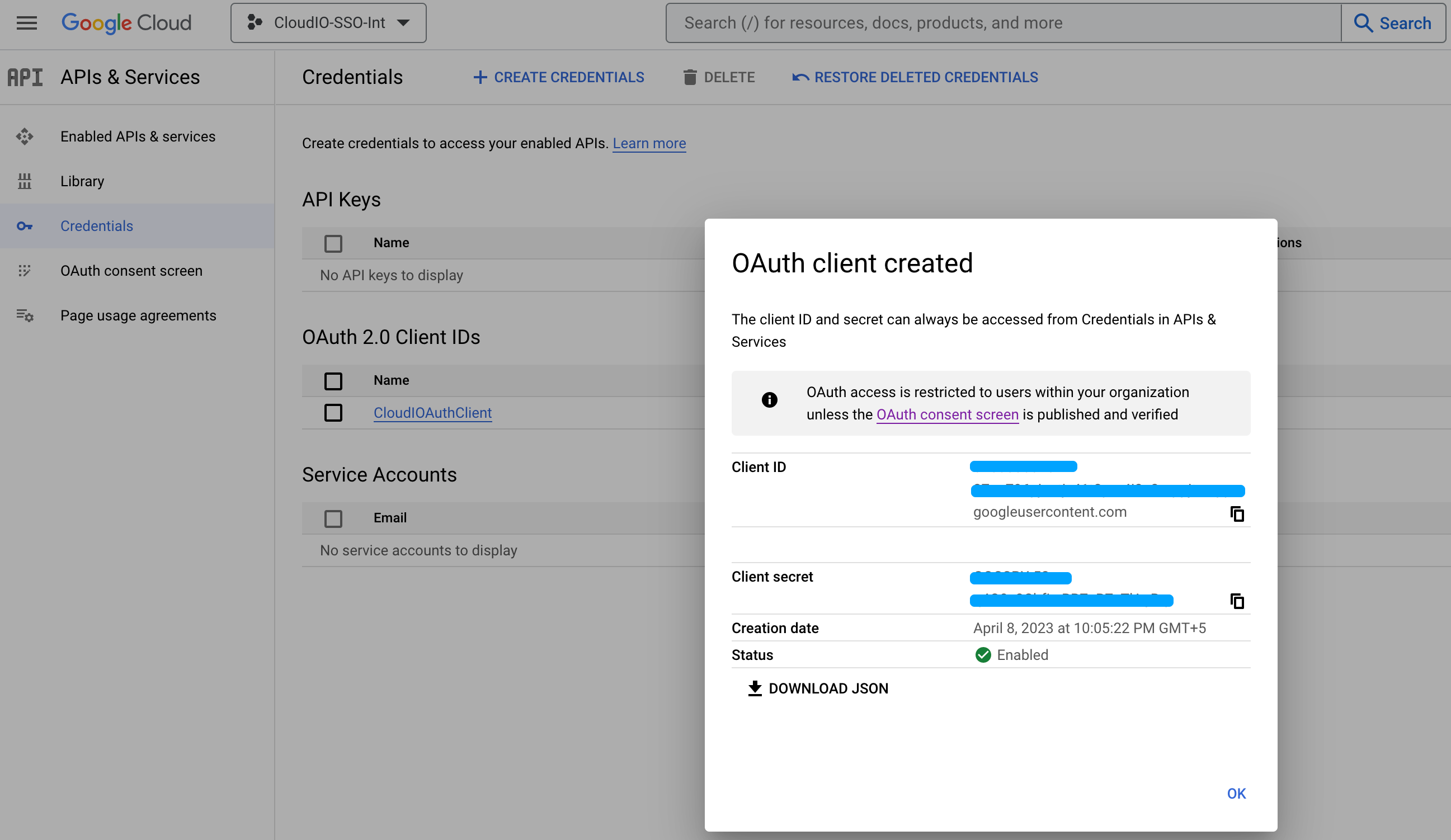
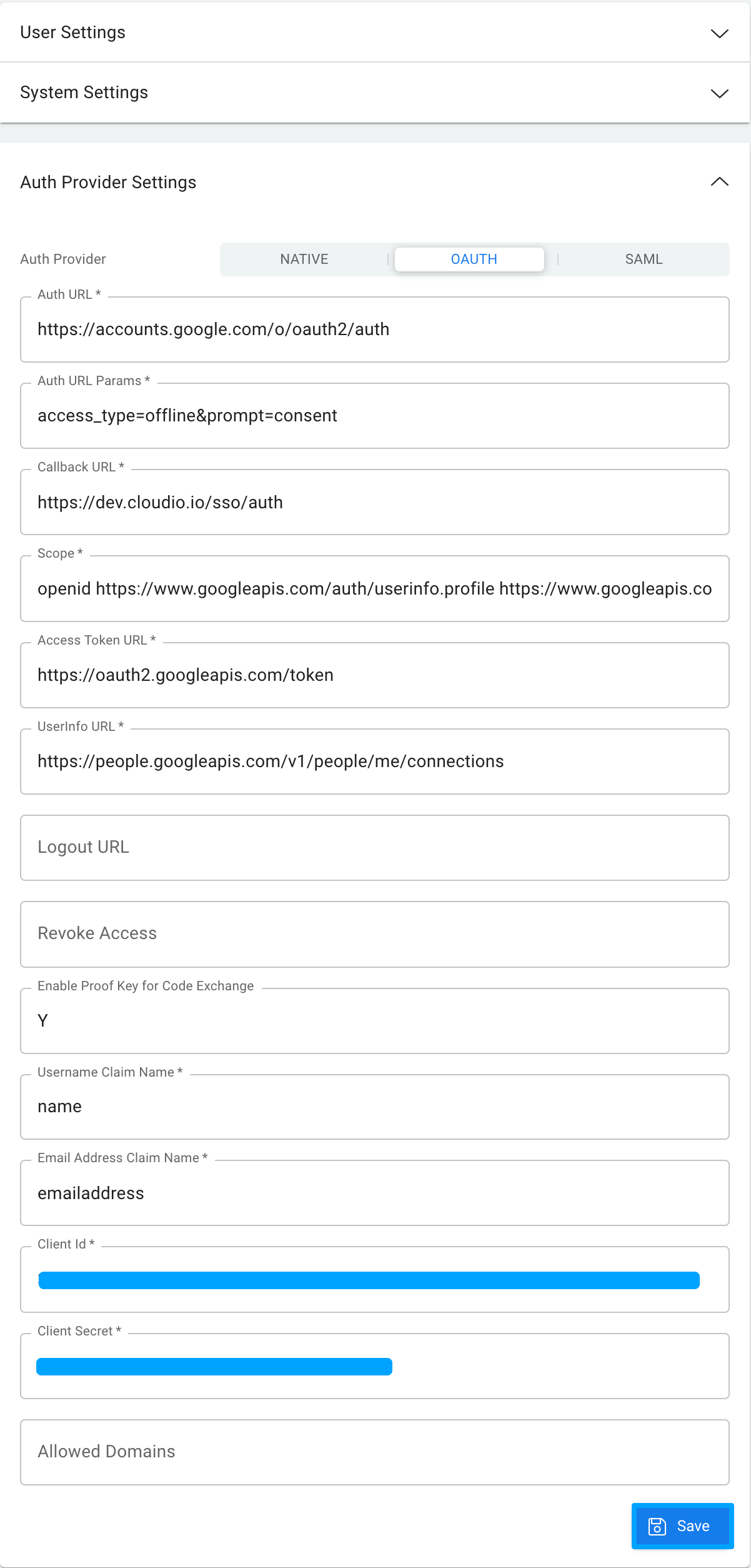
There is built-in support for OAuth 2 services like Auth0, and Google Auth API, that you can leverage to configure SSO for your application instead of using the built-in Authentication provided by the platform.

#### Patch Management

Patch Management can be used to migrate your application metadata from one instance to another. You can download the complete Application patch or a partial patch with cherry-picked objects, which can then be source controlled and uploaded into the target system for code migration.

#### Profile Values

You can define profile options (similar to ENV variables) and specify values at various levels via. User, Role, Application & Organization.

![db.getProfile](/files/GFB3NjqQrA4N8AyajssT)

#### Redis Cache

Redis is used for caching metadata for superior performance. You can use the Redis cache to store application data as needed using the built-in cache APIs.

![cache API](/files/gnddriQPwhVgeb2PmNom)

#### Role Based Access

You can define various Roles at the Application level and assign them to respective users. DataSources can then be assigned to different roles with different permissions via. Read, Insert, Update, Delete, Audit & Export.

#### Schedule Jobs

You can create Cloud Functions and schedule them to run at a specific date and time or regular interval using CRON expression.

#### Workflow Engine

The CloudIO workflow engine is highly scalable and flexible. You can extend the workflow engine by adding your custom Workflow Nodes in the language of your choice.

![Workflow Designer](/files/NFF0nXqoh6szkSxhzuCK)

> There is also a built-in way of defining custom workflow nodes using Javascript as shown below.

![Custom Workflow Node](/files/EwzfxKT8psPkdFE3hIU8)


# Scalability

Half a million requests under 10 minutes with 1K concurrent connections

To demonstrate the scalability of the platform, see below the output of a simple load test with wrk.

{% hint style="info" %}
Load test run with 1000 connections for a duration of 10 minutes
{% endhint %}

```bash
wrk -t50 -c1000 -d600s -s wrk.lua "http://localhost:3090/v1/api?csrf=..."
```

> Each request validates the Authorization header, verifies that the user have access to perform a query on the given datasource, fetches the datasource metadata from Redis Cache or the database, if the cache is invalid, constructs and executes the SQL query against the MySQL database and returns the results.

![wrk.lua script file content](/files/-Mb9VVr-vg8TJprDCvtU)

![Docker Stats after before the run](/files/-MbDV44ifZJMP3Pl7NAx)

![wrk output](/files/-MbDUj26PHTBQrQxtULq)

![Docker Stats after the run](/files/-MbDUYCpbASZhtdpwIRQ)

![Docker Resources - 6 CPU - 4GB RAM](/files/-MbDWwOAo7GQWWPAk4Fe)


# Installation

## Using Docker

Install Docker Desktop: <https://www.docker.com/products/docker-desktop>

{% hint style="warning" %}
You must allocate a minimum of 4GB memory for the docker.
{% endhint %}

![](/files/-MbDWwOAo7GQWWPAk4Fe)

Download [cloudio\_demo.zip](https://drive.google.com/file/d/1Bhut2FAxQHjdzaYQvVPAxhagjoSxUntl/view?usp=sharing) & unzip

```
unzip cloudio_demo.zip
cd cloudio_demo
./start.sh
```

Launch CloudIO Apps using any modern browser <http://localhost>

Sign-in as demo / demo

![Docker Containers](/files/-MbDXXWJqfPzzrcYkr5l)

### docker-compose.yml

```yaml
version: "3.1"

services:
  traefik:
    image: traefik:2.3
    container_name: cloudio-traefik
    command:
      - --providers.file.directory=/storage/config
      - --providers.file.watch=true
      - --providers.docker=true
      - --providers.docker.exposedByDefault=false
      - --providers.docker.constraints=Label(`traefik.constraint-label-stack`,`cloudio`)
      - --entrypoints.web.address=:80
      - --entrypoints.websecure.address=:443
    restart: unless-stopped
    ports:
      - 80:80
      - 443:443
    volumes:
      - /var/run/docker.sock:/var/run/docker.sock
      - cloudio-config:/storage/config:ro
      - cloudio-certificates:/storage/certificates:ro
    depends_on:
      - cloudio
    networks:
      - gateway
      - cloudio
  mysql:
    build: mysql
    container_name: cloudio-mysql
    restart: unless-stopped
    ulimits:
      nofile:
        soft: 20000
        hard: 40000
    ports:
      - 3306:3306
    logging:
      driver: json-file
    networks:
      - cloudio
    volumes:
      - cloudio-mysql:/var/lib/mysql:rw
  zookeeper:
    image: "bitnami/zookeeper:3.5.7"
    container_name: cloudio-zookeeper
    restart: unless-stopped
    logging:
      driver: json-file
    environment:
      - ALLOW_ANONYMOUS_LOGIN=yes
      - ZOO_LOG_LEVEL=WARN
    networks:
      - cloudio
    volumes:
      - cloudio-zookeeper:/bitnami/zookeeper:rw
    depends_on:
      - mysql
  kafka:
    image: "bitnami/kafka:2.7.0"
    container_name: cloudio-kafka
    restart: unless-stopped
    logging:
      driver: json-file
    environment:
      - KAFKA_CFG_ZOOKEEPER_CONNECT=zookeeper:2181
      - KAFKA_CFG_ADVERTISED_LISTENERS=PLAINTEXT://kafka:9092
      - ALLOW_PLAINTEXT_LISTENER=yes
    depends_on:
      - zookeeper
    networks:
      - cloudio
    volumes:
      - cloudio-kafka:/bitnami/kafka:rw
  redis:
    image: redis:6
    container_name: cloudio-redis
    restart: unless-stopped
    networks:
      - cloudio
    volumes:
      - cloudio-redis:/data:rw
    depends_on:
      - kafka
  cloudio:
    build: cloudio
    container_name: cloudio
    restart: unless-stopped
    logging:
      driver: json-file
    networks:
      - cloudio
    labels:
      - traefik.enable=true
      - traefik.constraint-label-stack=cloudio
      - traefik.http.routers.cloudio.rule=PathPrefix(`/`)
      - traefik.http.routers.cloudio-secure.rule=PathPrefix(`/`)
      - traefik.http.routers.cloudio-secure.tls=true
    volumes:
      - cloudio-config:/storage/config:rw
      - cloudio-certificates:/storage/certificates:rw
    depends_on:
      - kafka
      - mysql
      - redis

networks:
  gateway:
  cloudio:

volumes:
  cloudio-mysql:
  cloudio-redis:
  cloudio-certificates:
  cloudio-config:
  cloudio-kafka:
  cloudio-zookeeper:
```

## Manual Installation

### Install Apache Kafka or use Confluent Cloud

{% hint style="info" %}
Refer to the following links to download and install Apache Kafka 2.7.1 <https://www.apache.org/dyn/closer.cgi?path=/kafka/2.7.1/kafka_2.13-2.7.1.tgz> <https://kafka.apache.org/quickstart> <https://www.confluent.io/confluent-cloud/pricing>
{% endhint %}

### Install MySQL or use any Cloud Service for MySQL

{% hint style="info" %}
Refer to the following link for MySQL installation <https://dev.mysql.com/doc/mysql-installer/en/>
{% endhint %}

### Install Redis or use any Cloud Service for Redis

{% hint style="info" %}
Refer to the following link to install Redis <https://redis.io/topics/quickstart>
{% endhint %}

### Install Load Balancer/Reverse Proxy or a related service from your Cloud provider

{% hint style="info" %}
You can use either a hardware or software load balancer for load balancing, reverse proxy and SSL termination. e.g. nginx, apache etc. Refer to the following link to install nginx <https://www.nginx.com/resources/wiki/start/topics/tutorials/install/>
{% endhint %}

{% hint style="success" %}
Configure your load balancer/reverse proxy to redirect the incoming HTTPS & WSS requests to the host(s)/port(s) on which the CloudIO Platform is configured to run.
{% endhint %}

#### Example NGINX Configuration with single instance of platform running on localhost:3090

```
   ...

    upstream wsbackend {
        server localhost:3090;
    }
    
    server {
        listen 80 default_server;
        server_name subdomain.example.com;
        return 301 https://$server_name;
    }
    
    server {
        listen       443 ssl http2 default_server;
        server_name  subdomain.example.com;

        ssl_certificate "/cloudio/ssl/bundle.crt";
        ssl_certificate_key "/cloudio/ssl/star_example_com.key";
        ssl_session_cache shared:SSL:1m;
        ssl_session_timeout  10m;
        ssl_ciphers PROFILE=SYSTEM;
        ssl_prefer_server_ciphers on;

        # Load configuration files for the default server block.
        include /etc/nginx/default.d/*.conf;

        location /ws/ {
            proxy_set_header X-Forwarded-For $proxy_add_x_forwarded_for;
            proxy_set_header Host $host;
            proxy_pass http://wsbackend;
            proxy_http_version 1.1;
            proxy_set_header Upgrade $http_upgrade;
            proxy_set_header Connection $connection_upgrade;
        }

        location / {
            proxy_pass http://localhost:3090;
            proxy_set_header   Host               $host;
            proxy_set_header   X-Real-IP          $remote_addr;
            proxy_set_header   X-Forwarded-Proto  $scheme;
            proxy_set_header   X-Forwarded-For    $proxy_add_x_forwarded_for;
            proxy_connect_timeout       600;
            proxy_send_timeout          600;
            proxy_read_timeout          600;
            send_timeout                600;
        }
    }
    
    ...
```

{% hint style="warning" %}
Make sure to either use a trusted network or SSL/TLS-enabled Redis, Kafka & MySQL
{% endhint %}

### Install CloudIO Platform

Once you obtain a license from CloudIO, follow the instructions to download cloudio-platform.zip and unzip to a directory e.g. /mnt/cloudio and update the .env file with appropriate values for the following environment variables

### **Security Environment Variables**

<table><thead><tr><th width="263">Variable Name</th><th width="291">Description</th><th width="137">Mandatory</th><th width="176">Applicable Values</th><th>Default Value</th></tr></thead><tbody><tr><td>API</td><td>Set it to true to enable the API Service (UI Backend)</td><td>Yes</td><td>true, false</td><td></td></tr><tr><td>SCHEDULER</td><td>Set it to true to enable the scheduler service</td><td>Yes</td><td>true, false</td><td></td></tr><tr><td>WORKFLOW</td><td>Set it to true to enable the multi-node workflow service</td><td>Yes</td><td>true, false</td><td></td></tr><tr><td>IO_ENV</td><td>development/test/production</td><td>Yes</td><td>development/test/production</td><td>development</td></tr><tr><td>JWT_SECRET</td><td>Used to encode/decode JWT tokens</td><td>Yes</td><td></td><td>secret</td></tr><tr><td>ARGON_SECRET</td><td>Used for password hashing</td><td>Yes</td><td></td><td>secret</td></tr><tr><td>ARGON_ITERATIONS</td><td>Used for a number of iterations to generate password hashing</td><td>No</td><td></td><td></td></tr><tr><td>ARGON_MEMORY_SIZE</td><td>Used for an amount of memory to generate password hashing</td><td>No</td><td></td><td></td></tr><tr><td>INSTANCE_ID</td><td>A unique name for this instance</td><td>Yes</td><td></td><td>cloudio_node1</td></tr><tr><td>HOST</td><td>An IP address and port combination on which the web server listens for incoming connections. You can run multiple instances on the same host with different ports and/or on multiple hosts depending on the load. A single instance can scale upto a million requests per 20 minutes.</td><td>Yes</td><td></td><td>127.0.0.1:3090</td></tr><tr><td>API_RATELIMIT</td><td>Number of API calls allowed per IP address per hour</td><td>Yes</td><td></td><td>1000</td></tr><tr><td>AUTH_RATELIMIT</td><td>Number of sign-in API calls allowed per IP address per hour</td><td>Yes</td><td></td><td>12</td></tr><tr><td>STATUS_RATELIMIT</td><td>Number of stutus API calls allowed per IP address per hour</td><td>Yes</td><td></td><td>60</td></tr><tr><td>TMP_DIR</td><td>Temp directory path</td><td>Yes</td><td></td><td>tmp</td></tr><tr><td>ENCRYPTED_ARGS</td><td>Set it to N to encrypt few env variables(JWT_SECRET, ARGON_SECRET, DATABASE_URL, READONLY_DATABASE_URL REDIS_URL, SMTP_PASSWORD, SASL_PASSWORD, ADMIN_PASSWORD, DB_PKCS12_PASSWORD)</td><td>No</td><td>Y,N</td><td>N</td></tr><tr><td>ADMIN_EMAIL</td><td>For the first time installation, platform will create a admin user with this given email address</td><td>No</td><td></td><td></td></tr><tr><td>ADMIN_PASSWORD</td><td>For the first time installation, platform will create a admin user with this given password</td><td>No</td><td></td><td></td></tr><tr><td>JS_DIR</td><td>Directory for the js libraries</td><td>Yes</td><td></td><td>js</td></tr><tr><td>THUMBNAILS_DIR</td><td>Directory for storing thumbnails</td><td>Yes</td><td></td><td>thumbnails</td></tr><tr><td>MULTI_TENANT</td><td>To enable multi tenant setup</td><td>Yes</td><td></td><td>N</td></tr><tr><td>X_FRAME_OPTION</td><td>Set a value for this to add a X_FRAME_OPTION header for server requests</td><td></td><td>DENY,SAMEORIGIN,_</td><td>DENY</td></tr><tr><td>MFA</td><td>Set it to EMAIL to enable MFA for sign-in (send a code to email while signing in)</td><td>Yes</td><td>EMAIL,OFF</td><td>OFF</td></tr><tr><td>MD_DB_TYPE</td><td>Metadata database type</td><td>Yes</td><td>mysql,postgres,oracle</td><td>mysql</td></tr><tr><td>LIVE_INTERVAL_SECONDS</td><td>Set a value in seconds to send live updates to clients</td><td>Yes</td><td></td><td>15</td></tr><tr><td>SQL_TIMEOUT_SECONDS</td><td>Set a value in seconds to set the timeout for the SQL query</td><td>Yes</td><td></td><td>120</td></tr><tr><td>MAX_CONCURRENT_REQUESTS</td><td>Set a value to allow maximum concurrent client requests on the server </td><td>Yes</td><td></td><td>40</td></tr><tr><td>SCHEDULER_SLEEP_SECONDS</td><td>Set a value to set a sleep time before running  schedulers</td><td>Yes</td><td></td><td>60</td></tr><tr><td>PUBLIC_TINY_URL</td><td>Set it true to allow the public user to create a shared URL</td><td>Yes</td><td></td><td></td></tr><tr><td>AGENT</td><td>To enable Agent setup</td><td>No</td><td></td><td></td></tr></tbody></table>

### Database **Environment Variables**

<table><thead><tr><th width="264">Variable Name</th><th width="293">Description</th><th width="136">Mandatory</th><th width="176">Applicable Values</th><th width="100">Default Value</th></tr></thead><tbody><tr><td>DATABASE_URL</td><td>Specify the Database Url to connect metadata.  </td><td>Yes</td><td></td><td></td></tr><tr><td>READONLY_DATABASE_URL</td><td>Used for running ad hoc queries from SQL Worksheet</td><td>Yes</td><td>Same as DATABASE_URL with readonly database user</td><td></td></tr><tr><td>ROOT_DATABASE_URL</td><td>Same as DATABASE_URL with root database user</td><td>No</td><td>Same as DATABASE_URL with root database user</td><td></td></tr><tr><td>DB_ROOT_CERT_PATH</td><td>CA cert path</td><td>No</td><td></td><td></td></tr><tr><td>DB_PKCS12_PATH</td><td>Private key in PKCS12 format</td><td>No</td><td></td><td></td></tr><tr><td>DB_PKCS12_PASSWORD</td><td>Private key password if any</td><td>No</td><td></td><td></td></tr><tr><td>DB_ACCEPT_INVALID_CERTS</td><td>To accept invalid certs (self signed certs)</td><td>No</td><td>true,false</td><td></td></tr><tr><td>DB_SKIP_DOMAIN_VALIDATION</td><td>To skip domain validation</td><td>No</td><td>true,false</td><td></td></tr><tr><td>ALLOW_SQL_WORKSHEET_UPDATES</td><td>Whether or not to allow ad hoc updates via. SQL Worksheet. Set this to N in Production &#x26; UAT instance.</td><td>Yes</td><td>Y,N</td><td>N</td></tr></tbody></table>

### Azure **Environment Variables**

<table><thead><tr><th width="265">Variable Name</th><th width="293">Description</th><th width="138">Mandatory</th><th width="170">Applicable Values</th><th>Default Value</th></tr></thead><tbody><tr><td>AZURE_CLIENT_SECRET</td><td>Azure key vault  account client secret</td><td>No</td><td></td><td></td></tr><tr><td>AZURE_CLIENT_ID</td><td>Azure key vault  account client id</td><td>No</td><td></td><td></td></tr><tr><td>AZURE_TENANT_ID</td><td>Azure key vault  account tenant id</td><td>No</td><td></td><td></td></tr><tr><td>AZURE_KEY_VAULT_URL</td><td>Azure key vault url</td><td>No</td><td></td><td></td></tr><tr><td>AZURE_STORAGE_ACCOUNT</td><td>Azure storage account</td><td>No</td><td></td><td></td></tr><tr><td>AZURE_STORAGE_MASTER_KEY</td><td>Azure storage account master key</td><td>No</td><td></td><td></td></tr></tbody></table>

### Redis **Environment Variables**

<table><thead><tr><th width="266">Variable Name</th><th width="295">Description</th><th width="136">Mandatory</th><th width="179">Applicable Values</th><th>Default Value</th></tr></thead><tbody><tr><td>REDIS_PREFIX</td><td>To assign a prefix value for keys stored in Redis</td><td>No</td><td>dev</td><td>dev</td></tr><tr><td>REDIS_URL</td><td>URL of the Redis server</td><td>No</td><td></td><td></td></tr></tbody></table>

### Kafka **Environment Variables**

<table><thead><tr><th width="266">Variable Name</th><th width="317">Description</th><th width="134">Mandatory</th><th width="272">Sample Values</th><th>Default Value</th></tr></thead><tbody><tr><td>KAFKA_PREFIX</td><td>To assign a prefix value for topic names before creating in Kafka</td><td>No</td><td></td><td></td></tr><tr><td>BOOTSTRAP_SERVERS</td><td>Kafka bootstrap server URL. If using a cloud instance from confluent then provide appropriate values for the additional variables SECURITY_PROTOCOL, SASL_MECHANISMS, SASL_USERNAME &#x26; SASL_PASSWORD provided by confluent cloud when creating a new Kafka cluster</td><td>No</td><td><p>#Local Kafka</p><p>BOOTSTRAP_SERVERS=localhost:9092</p><p></p><p>#Kafka on Confluent Cloud</p><p>BOOTSTRAP_SERVERS=p...5.us-west-2.aws.confluent.cloud:9092 SECURITY_PROTOCOL=SASL_SSL SASL_MECHANISMS=PLAIN SASL_USERNAME=SR4C...OP4DIA SASL_PASSWORD=j4StZg8Kg7m...B5Kgant9A</p></td><td></td></tr><tr><td></td><td></td><td></td><td></td><td></td></tr><tr><td></td><td></td><td></td><td></td><td></td></tr><tr><td>SECURITY_PROTOCOL</td><td></td><td>No</td><td></td><td></td></tr><tr><td>SASL_MECHANISMS</td><td></td><td>No</td><td></td><td></td></tr><tr><td>SASL_USERNAME</td><td></td><td>No</td><td></td><td></td></tr><tr><td>SASL_PASSWORD</td><td></td><td>No</td><td></td><td></td></tr></tbody></table>

### Log **Environment Variables**

<table><thead><tr><th width="265">Variable Name</th><th width="322">Description</th><th width="133">Mandatory</th><th width="172">Applicable Values</th><th>Default Value</th></tr></thead><tbody><tr><td>LOG_OUTPUT</td><td>file or console</td><td>Yes</td><td>console, file</td><td>file</td></tr><tr><td>LOG_SQLS</td><td>Set it true to log the SQL queries and it's params</td><td>Yes</td><td>true,false</td><td>false</td></tr><tr><td>LOG_VIEWER_KEY</td><td>Key to access a logs without a session</td><td><br>Yes</td><td></td><td>viG_D6Zo6mtXDAt_3Z</td></tr><tr><td>ENABLE_LOG_VIEWER_USING_KEY</td><td>Set it true to access the logs without a session using a unique key</td><td>Yes</td><td>true,false</td><td>true</td></tr></tbody></table>

### Email **Environment Variables**

<table><thead><tr><th width="262">Variable Name</th><th width="326">Description</th><th width="133">Mandatory</th><th width="174">Applicable Values</th><th>Default Value</th></tr></thead><tbody><tr><td>EMAIL_PROVIDER</td><td>Different email providers</td><td>Yes</td><td>GMAIL, SMTP</td><td></td></tr><tr><td>SMTP_HOST</td><td>SMTP Host Name to be used for sending email alerts</td><td>Yes</td><td></td><td></td></tr><tr><td>SMTP_PORT</td><td>SMTP port number</td><td>No</td><td></td><td></td></tr><tr><td>SMTP_USE_TLS</td><td>To enable SMTPS</td><td>No</td><td>true,false</td><td></td></tr><tr><td>SMTP_USERNAME</td><td>SMTP Username</td><td>if EMAIL Yes</td><td></td><td></td></tr><tr><td>SMTP_PASSWORD</td><td>SMTP Password</td><td>if EMAIL Yes</td><td></td><td></td></tr><tr><td>GMAIL_CREDENTIAL_FILE_PATH</td><td>GMAIL Service Account Credentials Path</td><td>if GMAIL Yes</td><td></td><td></td></tr><tr><td>SMTP_FROM</td><td>From email address to be used for the outbound emails</td><td>Yes</td><td></td><td></td></tr></tbody></table>

### Sample .env

{% code title=".env" %}

```bash
# CloudIO Services
API=true
SCHEDULER=true
WORKFLOW=true

# Redis
# REDIS_URL="rediss://:redis_password@localhost:6379/#insecure"
# REDIS_URL="redis://localhost:6379/"
REDIS_URL="1233b5c090a64...iI="

# Secrets
JWT_SECRET="589b75fc4506...Km3KN2p8A=="
ARGON_SECRET="ebc8b30629d84...LLChImG5034="

# CloudIO Server
DEFAULT_SUBDOMAIN=cloudio
IO_ENV=development

# CloudIO Server on HTTPS
# IO_ENV=production

# Log
LOG=io_common=debug,cloudio=trace,warn
BACKTRACE=full
LOG_OUTPUT=file # console
RUSTFLAGS="-Zinstrument-coverage"

# MySQL Database
DATABASE_URL="fd56327978faab...WdMuuwp54F78//ESzpfHefhlw=="
READONLY_DATABASE_URL="fd56327975fZK...BbFu3tLfHefhlw=="
DB_ACCEPT_INVALID_CERTS=true

# Local Kafka
BOOTSTRAP_SERVERS=localhost:9092

# Kafka on Confluent Cloud
#BOOTSTRAP_SERVERS=p...5.us-west-2.aws.confluent.cloud:9092
#SECURITY_PROTOCOL=SASL_SSL
#SASL_MECHANISMS=PLAIN
#SASL_USERNAME=SR4C...OP4DIA
#SASL_PASSWORD=j4StZg8Kg7m...B5Kgant9A

# On Mac (Optional)
# SSL_CA_LOCATION=/etc/ssl/cert.pem

# On Linux
# SSL_CA_LOCATION=probe

INSTANCE_ID=dev_node

# gmail
SMTP_HOST=smtp.gmail.com
SMTP_USERNAME=noreply@example.com
SMTP_PASSWORD=5e848...t1Go=
SMTP_FROM=noreply@example.com

HOST=127.0.0.1:3090

API_RATELIMIT=1000

ADMIN_PASSWORD="a8e79...1QWTA=="
ADMIN_EMAIL=admin...@example.com

ORG=cloudio
APP=cloudio
SECRET="super strong secret xyz##$^#%3245"

TMP_DIR=tmp

ALLOW_SQL_WORKSHEET_UPDATES=Y # N in UAT/PROD

```

{% endcode %}

### Running the Application

Change directory to where the cloudio-platfrom.zip is extracted and run **`./start.sh`** from command prompt. The platform will install all necessary database objects and create necessary kafka topics as needed at startup.

### Running it for the first time

When you start the server for the very first time, all the necessary tables would get created and populated with initial seed data. The platform will also create the initial `admin` user with full privileges. You must setup the following environment variables (only for the first time startup)

| Environment Variable | Description                                                                                                 |
| -------------------- | ----------------------------------------------------------------------------------------------------------- |
| ADMIN\_EMAIL         | Admin user's email address. This needs to be a valid email, otherwise you cannot reset/change the password. |
| ADMIN\_PASSWORD      | Password to be used for the newly created `admin` user                                                      |

### Encrypting Environment Variables

{% hint style="info" %}
AES 256 with IV is used for encryption/decryption
{% endhint %}

{% hint style="info" %}
You must setup the environment variable `SECRET` with a super secure key. Once set, you must not change the value as it may be used to encrypt your application data. We will provide a CLI option to change the SECRET, which will automate the processing re-encrypting the data with the new SECRET.
{% endhint %}

The following environment variables must be encrypted before starting the server. You can use the sub-command `encrypt` (see an example below) to encrypt all the required values

> Sample command to encrypt the REDIS\_URL environment value

```bash
./cloudio encrypt --value "redis://localhost:6379/"

Output:
-------

        Done ✨ You can use any of the following values
---------------------------------------------------------------
1233b5c090a64afa8032524e0c1698a4ZaLIIMOa9m/1OFpH0aFV12...=
190f684d4f2240a19bb1b86e8b58f41cApLuUI1m6isQVz413JcfAc...87I=
6950494897d14e27bd4983ba44fde2bdP0CPTF+6HCbbx5DQZ...B3tg=
---------------------------------------------------------------

// .env
// REDIS_URL="1233b5c090a64afa8032524e0c16...XdXEj3Cq/jkiI="
```

| Environment Variable to be encrypted |
| ------------------------------------ |
| JWT\_SECRET                          |
| ARGON\_SECRET                        |
| DATABASE\_URL                        |
| READONLY\_DATABASE\_URL              |
| REDIS\_URL                           |
| SMTP\_PASSWORD                       |
| SASL\_PASSWORD                       |
| ADMIN\_PASSWORD                      |
| DB\_PKCS12\_PASSWORD                 |

## High Volume Usage

If the server has to serve more than a million requests per hour, you must set up a scalable cluster for Kafka & Redis. The database must be scaled up according to the usage, and multiple platform instances must be run parallel to support the load.

## Backups

Make sure to set up regular backups for MySQL.

## Single Node Deployment

For simple deployment, you can disable Kafka, Blob Storage & Redis.

Use Cases for Single Node Deployment

* Development Instances
* Trial Instances
* Production Instances with less than 3000 users and when scaling/high availability is not necessary

#### Environment Variables Setup for Single Node Installation

```properties
# Setting WORKFLOW to false will disable multi-node workers
WORKFLOW=false

# Comment out REDIS_URL to disable Redis usage
# REDIS_URL

# Comment out BOOTSTRAP_SERVERS to disable Kafka usage
# BOOTSTRAP_SERVERS
```

## Multi-Node Deployment without Kafka

#### Environment Variables Setup for Multi-Node Installation without Kafka

```properties
# Setting WORKFLOW to false will disable multi-node workers
WORKFLOW=true

# Comment out REDIS_URL to disable Redis usage unless you need data
# caching in your applications logic
# REDIS_URL

# Comment out BOOTSTRAP_SERVERS to disable Kafka usage
# BOOTSTRAP_SERVERS

# Setting ENABLE_CLUSTER to true will allow multiple nodes
# to be up and running, forming a cluster
ENABLE_CLUSTER=true

# The leader node will listen to port 3030 on the private IP address
CLUSTER_HOST=:3030

# Set the hostname to "fargate" when deploying on AWS fargate. 
# The private IP will be fetched using the fargate metadata API during the startup
CLUSTER_HOST=fargate:3030
```


# Getting Started

## Overview

A brief description of all the tools available at your disposal when you log in as a developer or administrator.

{% content-ref url="/pages/Gw4BgKhLecO0AOXXI2Le" %}
[Overview](/getting-started/overview)
{% endcontent-ref %}

## Building Application

### What is an Application?

An Application is a collection of various components via. pages, data sources, functions, workflows, roles, access controls etc. Once an application is developed, you can then easily migrate it from one instance to another in just a few clicks.

### Application Data

Each application can be backed by its database. All the application data will be stored in the configured database schema. Use the connections sidebar panel to manage different database connections.

### External System Integrations

When building enterprise applications, there may be some use cases for which you may have to pull in data from external systems and at times even push data to the external systems. As long as there are REST APIs exposed by those external systems or allow direct database connections, you can integrate those external systems using external data sources and build a page or dashboard that can display data from one or more such systems.

### Steps Involved

#### Define a Storage Connection

Using the Storage Connection panel, define a new storage connection if not already defined. This storage connection will be used by any file attachments or CSV upload/download performed via the application.

<figure><img src="/files/0CkXaWk8yQQuzcLaA0MP" alt=""><figcaption><p>Edit Storage Connection Panel</p></figcaption></figure>

#### Define a Database Connection

Using the connections panel, define a new connection for your application. Give a unique code, name and choose the database type and provide the connection URL in a format supported by the database type. Optionally provide a script to be executed every time a connection is pulled out from the pool to service user requests.

{% hint style="info" %}
Also define an additional read-only connection with a database user who only has read permissions to the application data. This read-only connection will be used by SQL Worksheet when authorized users issue ad-hoc SQL queries.
{% endhint %}

<figure><img src="/files/UCHRQwJ1Gqmb27G6epfM" alt=""><figcaption><p>Edit Connection Panel</p></figcaption></figure>

#### Define the Application using the above connection

Using the Applications panel, create a new application and choose the database connections and storage connection. You must define a storage connection if not already done using the Storage Connections panel.

<figure><img src="/files/TX4Hv3dZF1OAwkKL7DUR" alt=""><figcaption><p>Application Header Toolbar</p></figcaption></figure>

<figure><img src="/files/DAo6duwZ5RPH3VAs9P6h" alt=""><figcaption><p>Edit Application Panel</p></figcaption></figure>

#### Define Roles

Create one or more roles as per the user personas required for the application. Choose a unique code & name for each role. A role is used to grant access permission on pages & data sources. You can also define new roles by copying permissions from an existing role.

<figure><img src="/files/Lb8EaTcHtrL1vg1hWKOu" alt=""><figcaption><p>Application Roles Panel</p></figcaption></figure>

#### Define DataSource

Using the DataSource panel, define one or more data sources as needed for your application. If your database tables are already created, make sure the existing tables have the necessary [WHO Columns](/datasource/who-columns) if the application needs to update the data in those tables. If you do not have the tables pre-defined, then use the From Scratch option to manually defined a data source.

<figure><img src="/files/HJVMg0sgKIBVfZtQCOMa" alt=""><figcaption><p>DataSource Creation Wizard</p></figcaption></figure>

When manually defining a data source, choose the appropriate data type and max length for the attributes.

{% hint style="info" %}
Note: When you add a new field (also called an Attribute) to an existing data source, a column is added to the database table.
{% endhint %}

<figure><img src="/files/QL5MlTeUfHb1xaY2SzkU" alt=""><figcaption><p>Add or Edit Field Panel</p></figcaption></figure>

After defining a data source, navigate to Access Settings and assign the appropriate privileges to various roles.

<figure><img src="/files/lxZd1J4CnFc8dP5eFRnt" alt=""><figcaption><p>DataSource More Actions Menu</p></figcaption></figure>

<figure><img src="/files/H0Y8TxfLBv8mvcqDyi2y" alt=""><figcaption><p>DataSource Access Settings</p></figcaption></figure>

#### Define Pages

Using the Pages panel, create one or more pages as needed for the application. For a simple page with CRUD operations, chose the Generate for a DataSource option to auto-generate a page for each data source. Start with a blank page, for more complex UIs. There are some pre-defined templates you can choose from as a quick start while building a page.

<figure><img src="/files/84RCq0Sf0pyFHxUxESLb" alt=""><figcaption><p>Create Page Wizard</p></figcaption></figure>

After creating a page, navigate to Access Settings and assign access to all the required roles.

<figure><img src="/files/1vgjX7CzymI7QwTqe3Bn" alt=""><figcaption><p>More Actions Menu</p></figcaption></figure>

{% hint style="warning" %}
No two developers can work on the same page at a time. If more than one developer is accessing the page at the same time, their profile icon will be shown on the header similar to google docs. When the other developer commits any changes to the page, the changes will automatically be pushed to all other users viewing the same page.
{% endhint %}

{% hint style="info" %}
As a best practice, divide the page into multiple sub-pages and use a wrapper page that embeds all the other sub-pages. That way different developers can work on a different part of the wrapper page at the same time.
{% endhint %}

<figure><img src="/files/wToCFw69fVComOat6jxb" alt=""><figcaption><p>Sample Page with Complex Layouts</p></figcaption></figure>

<figure><img src="/files/2rxL3izSMfbhXyZql8te" alt=""><figcaption><p>Designer View</p></figcaption></figure>

* Create cloud functions for more complex functionality
* Create an external data source to pull data from external systems.
* Define workflows for automating business processes e.g. Approvals
* Assign application roles to users
* Define lookups and profiles as needed for the application.
* Upload images to be used in the application.
* Define and use custom react component
* Define and use a custom workflow node
* Set up languages and upload labels for all the languages defined.
* Create test scripts for test automation
* Generate application patch and DB migration scripts for migrating the app from DEV to UAT & PROD.

## Advanced UI Topics

{% content-ref url="/pages/Icga36l5MfjLdAM8NzQx" %}
[App Controller](/ui/app-controller)
{% endcontent-ref %}

{% content-ref url="/pages/oOnl88Jj38U1CTJcBK5G" %}
[Page Controller](/ui/page-controller)
{% endcontent-ref %}

{% content-ref url="/pages/lnHlY1iayvi1A0nty3rJ" %}
[Custom Component](/ui/custom-component)
{% endcontent-ref %}

## Advanced Backend Topics

{% content-ref url="/pages/-Mavoj51EDwh69WpESo5" %}
[Server Side Scripts](/datasource/scripts)
{% endcontent-ref %}

{% content-ref url="/pages/-Mb5G\_dGz9ZhCwsUaBs9" %}
[Sample Scripts](/datasource/scripts/sample-scripts)
{% endcontent-ref %}

{% content-ref url="/pages/NYX6sgiE1uZVK8cCMKA7" %}
[Module Imports](/datasource/scripts/module-imports)
{% endcontent-ref %}

{% content-ref url="/pages/DXGsE9O0DS4N6dsoY4vd" %}
[WHO Columns](/datasource/who-columns)
{% endcontent-ref %}


# Overview

<figure><img src="/files/zVYsFIWTAOGi2EVNR7Sa" alt=""><figcaption><p>More Tabs</p></figcaption></figure>

When you sign in with a Developer or an Administrator role, a sidebar to access various panels will be visible. Use the More Tabs option on the sidebar to access all the available panels. Some of these panels may be hidden based on the roles you have. Find below a short description of each of the sidebar panels.

### Agent Groups

Set up and manage On-Premise Agent Groups. You can also view all the agents connected to any given agent group.

<figure><img src="/files/NaFX6tmNtyWAnV5nGUWn" alt=""><figcaption></figcaption></figure>

### API Playground

A Postman-like interface to explore and interact with all the data sources you have access to do so.

<figure><img src="/files/wmhI705qwce7fqxXGrIy" alt=""><figcaption></figcaption></figure>

### App Settings

Manage the current Application settings that can be customized on an application level.

<figure><img src="/files/OZ6Mddbw0wVjCZEBpZue" alt=""><figcaption><p>App Settings Panel</p></figcaption></figure>

### Applications

Create and manage various applications.

### Auth Provider

Setup your Organization's Authentication provider e.g. OAuth, SAML or Native.

<figure><img src="/files/LtP3bV8AXsq4mkXRRmkT" alt=""><figcaption></figcaption></figure>

### Component Store

Create and manage custom react components.

### Components

View help documentation of all the available components.

<figure><img src="/files/1Sjuw9aH4cBl5SAskwdO" alt=""><figcaption></figcaption></figure>

<figure><img src="/files/rVBAnt66r6JoJm2Lyz8u" alt=""><figcaption></figcaption></figure>

### Connections

Set up and manage database connections used by various applications.

### DataSource

Create and manage DataSource. Using data sources, you can allow your app to perform CRUD operations on your application database table or view. With the Oracle database, you can use the PLSQL wrapper package to perform the CUD operations. MySQL, PostgreSQL, MS SQL Server & Oracle are the supported databases.

### Email Requests

Monitor all the email requests sent.

### External DataSource

Create and manage external data sources. Using external data sources you can connect your app with any data exposed via. REST APIs.

### Functions

Create and manage cloud functions.

### Images

Upload and manage images used by your application.

### Kafka Topic Search

A tool to query messages from Kafka topics, for debugging purposes.

<figure><img src="/files/cz1FzfMNt0QHOeOXiiva" alt=""><figcaption></figcaption></figure>

### Languages

Define and manage languages supported by your applications. You can record all the labels shown to the user and upload the translated labels.

### Live Status

Monitor the server nodes & perform health checks.

<figure><img src="/files/HtK1z7XqSPQKEp6mAOYD" alt=""><figcaption></figcaption></figure>

### Lookups

Define and manage various lookup values used by the application.

### Pages

Create and manage application pages.

### Patch History

View all the previously applied patches. Download and upload application patches between DEV/UAT/PROD instances.

<figure><img src="/files/O5rcyVl9EA2N5ETB3CDC" alt=""><figcaption></figcaption></figure>

### Profiles

Setup and manage profile options used by the application

### Roles

Define and manage application roles.

### Scheduled Runs

Monitor the status of scheduled cloud functions and workflows.

### SQL Worksheet

Explore and interact with the application database objects

<figure><img src="/files/LvlQuCt7Uy9uTyJZW6W6" alt=""><figcaption></figcaption></figure>

### Storage Connections

Setup and manage blob storage connections e.g. Azure Blob Storage and S3

### Test Scripts

Create and manage application test scripts.

### Users

Create and manage organizational user accounts when the Auth Provider is set up as Native.

### Workflow Nodes

Create and manage custom workflow nodes.

### Workflows

Create and manage application workflows.

### More Details

Check the Service Architecture section for more details about the above components.

{% content-ref url="/pages/XlEkhvaKrZ0bmfCgqfbf" %}
[Service Architecture](/service-architecture)
{% endcontent-ref %}


# App Controller

Application level controller

App Controller can be used for the following purposes

1. Customize application level CSS (Look & Feel) using the [SX prop](https://mui.com/system/the-sx-prop)
2. Define utility functions that can be imported across different page controllers within the application
3. Define an application level React component that will stay mounted while the application is in use

> Example App Controller

{% code overflow="wrap" lineNumbers="true" %}

```typescript
import React from 'react';

function AppComponent(props) {
    console.log(props, 'AppComponent.render');
    React.useEffect(() => {
        // fetch and initialize app level data
        console.log(props, 'AppComponent.useEffect');
    }, []);
    return null;
}

export default {
    // refer https://mui.com/system/the-sx-prop
    getAppSX: async ({ theme, platform, appUid }) => {
        const darkMode = theme.palette.mode === 'dark';
        /*
        return {
            bgcolor: darkMode ? '#000' : '#fff',
            '& #someId': { display: 'none' },
            '& .someCSSClassName': { backgroundColor: theme.palette.background.paper }
        };
        */
        return {};
    },
    someCustomAppLevelUtilFunction: async () => {
        // you can invoke this function from any page controller
        // import { someCustomAppLevelUtilFunction } from 'app';
        // await someCustomAppLevelUtilFunction();
    },
    AppComponent, // AppComponent will be rendered at the root of the application and will remain mounted on all Pages within this Application
}
```

{% endcode %}

### Navigation Steps

Navigate to the App Settings on the sidebar and click on the Edit Application Controller icon on the header as shown below

![](/files/h59vcWnE9nR6NBWgFHeO)


# Page Controller

Application level controller

Page Controller can be used for the following purposes

1. Customize page level CSS (Look & Feel) using the [SX prop](https://mui.com/system/the-sx-prop)
2. Define event handler functions for supported components on the page
3. Define an page level React component that will stay mounted while the page is in use

{% hint style="info" %}
If you want complete control on the page, then define an empty page and return a PageComponent that takes up and control the whole page.
{% endhint %}

> Example Page Controller

{% code overflow="wrap" lineNumbers="true" %}

```typescript
import React from 'react';
import { Box } from '@mui/material';
import type { BaseFunctionProps, FormatColumnValueFunction, IOComponentProps, IconValueWithToolTip } from 'cloudio';
import { getSessionProperty } from 'cloudio';
import platform from 'platform';

function getUserName() {
    return getSessionProperty(platform, 'userName');
}

function PageComponent(props: IOComponentProps) {
  console.log(props, 'PageComponent.render');
  React.useEffect(() => {
      // fetch and initialize page level data
      console.log(props, 'PageComponent.useEffect');
  }, []);
  return null;
}

const NF = {
  USD: new Intl.NumberFormat('en-US', {
    style: 'currency',
    currency: 'USD',
  }),
};

const formatColumnValue: FormatColumnValueFunction = ({ viewAttribute, value, rawValue, record, theme }) => {
  if (rawValue) {
      let icon: IconValueWithToolTip | undefined;
      switch (rawValue) {
          case 7:
              icon = { iconName: 'check', color: theme.palette.success.main, iconType: 'light' };
              break;
          case 9:
              icon = { iconName: 'wrench', color: theme.palette.warning.main, iconType: 'light' };
              break;
          case 8:
              icon = { iconName: 'times', color: theme.palette.error.main, iconType: 'light' };
              break;
          default:
              icon = { iconName: 'desktop', color: theme.palette.primary.main, iconType: 'light', iconSize: 30, tooltip: 'some tooltip...' + value };
              break;
      }
      return { value, icon };
  }
  return value;
}

function onSomeTextFieldChange({ pageId, itemId, platform, oldValue, value, ...otherProps }: BaseFunctionProps) {
  // validate the user entered value
  if (value === 'test') {
      // show an error message to the user
      platform.showError(`Invalid value ${value}!`);
      // return the oldValue to override user entered value
      return oldValue;
  }
  return value;
}

function someDebugFunction(props: BaseFunctionProps) {
  // use this function to just print all the incoming properties
  // console.log(props);
}

async function getPageSX({ theme, platform, appUid }: BaseFunctionProps) {
  // refer https://mui.com/system/the-sx-prop/
  /*
  const darkMode = theme.palette.mode === 'dark';
  return {
      bgcolor: darkMode ? '#000' : '#fff',
      '& #someId': { display: 'none' },
      '& .someCSSClassName': { backgroundColor: theme.palette.background.paper }
  };
  */
  return {};
}

// must export a default object with all the functions to be used by this page
export default {
  formatColumnValue,
  // getPageSX, // page level sx prop refer https://mui.com/system/the-sx-prop/
  onSomeTextFieldChange,
  someDebugFunction,
  PageComponent, // PageComponent will be rendered at the root of the page and will get unmounted when the page is exited.
}
```

{% endcode %}

### Navigation Steps

Navigate to the Pages tab on the sidebar and click on the Edit Page icon as shown below

![](/files/2EoW2NXzm8XDzdWHsIOa)


# Controller Component

`Controller Component` can be used to create a page level custom component (one time) for some advanced use cases. The below example controller code exports a `Controller Component` named `QuickEntry` that renders couple quick entry input fields that makes parallel async calls to cloud functions and create records on tab out enabling users to perform high speed data entry.

{% code title="Page Controller" overflow="wrap" lineNumbers="true" %}

```tsx
import type { Store, BaseFunctionProps } from 'cloudio';
import { useStringAttribute, useNumberAttribute } from 'cloudio';
import { OmsPreOrderLines } from '@cloudio-saas/datasource-types';
import React, { useRef } from 'react';
import { Box, TextField } from '@mui/material';
import platform from 'platform';

async function createOrUpdateLine(
  linesStore: Store<OmsPreOrderLines>,
  id: string,
  resp: OmsPreOrderLines,
): Promise<string> {
  if (id) {
    // update record
    linesStore.updateRecord(id, resp);
  } else {
    // create record
    const newid = await linesStore.createNew({
      partialRecord: resp,
      addOnTop: true,
      rs: 'I',
    });
    if (!newid) {
      throw new Error('Failed to create new record!');
    }
    id = newid;
  }
  return id;
}

async function onQuickEntryQtyChange({
  appUid,
  pageId,
  itemId,
  platform,
}: BaseFunctionProps) {
  // get the stores
  const quickEntryStore = platform.getStore<OmsPreOrderLines>(
    appUid,
    pageId,
    'quickEntryAlias',
  );
  const linesStore = platform.getStore<OmsPreOrderLines>(
    appUid,
    pageId,
    'omsPreOrderLinesAlias',
  );
  if (!quickEntryStore || !linesStore) {
    platform.showError(`Store not found for ${itemId}`);
    return;
  }
  // get the current quick entry row
  const quickRow = quickEntryStore.getCurrentRecord();
  const { itemCode, itemQty } = quickRow;
  quickEntryStore.clearQuietyly().then(() => {
    quickEntryStore.createNew({ partialRecord: {}, rs: 'N' });
  });
  let id = '';
  // invoke cloud functions in parallel
  await Promise.all([
    platform
      .invokeCloudFunction(appUid, 'get-oms-item-details', {
        itemCode,
        itemQty,
      })
      .then(async (resp: OmsPreOrderLines) => {
        const { itemCode, itemQty, itemDesc } = resp;
        id = await createOrUpdateLine(linesStore, id, {
          itemCode,
          itemQty,
          itemDesc,
        });
        platform.redrawCanvasGrid(appUid, pageId, 'canvasGrid');
      }),
    platform
      .invokeCloudFunction(appUid, 'get-oms-item-price', { itemCode, itemQty })
      .then(async (resp: OmsPreOrderLines) => {
        const { sellPrice } = resp;
        id = await createOrUpdateLine(linesStore, id, {
          itemCode,
          itemQty,
          sellPrice,
        });
        platform.redrawCanvasGrid(appUid, pageId, 'canvasGrid');
      }),
  ]);
}

function QuickEntry(props: BaseFunctionProps) {
  // similar to useState hook in react for an attribute in the current record
  const [itemCode, setItemCode] = useStringAttribute('itemCode');
  const [itemQty, setItemQty] = useNumberAttribute('itemQty');
  // ref used for focus
  const ref = useRef<HTMLInputElement>(null);
  // ref to store the focus value
  const focusVal = useRef<number | undefined>(undefined);

  return (
    <Box sx={{ flex: 1, display: 'flex', minWidth: '400px', gap: '8px' }}>
      <TextField
        inputRef={ref}
        variant="standard"
        label="Item Code"
        value={itemCode ?? ''}
        onChange={(e) => {
          setItemCode(e.target.value);
        }}
        fullWidth
      />
      <TextField
        type="number"
        variant="standard"
        label="Item Qty"
        value={itemQty ?? ''}
        onChange={(e) => {
          let val: number | undefined = Number(e.target.value);
          if (Number.isNaN(val)) {
            val = undefined;
          }
          setItemQty(val);
        }}
        onFocus={() => {
          // store the existing value, so we can check against this in onBlur
          focusVal.current = itemQty;
        }}
        onBlur={(e) => {
          if (focusVal.current !== itemQty) {
            // value changed, create line
            onQuickEntryQtyChange(props);
            ref.current?.focus();
          }
        }}
        fullWidth
      />
    </Box>
  );
}

// must export a default object with all the functions to be used by this page
export default {
  QuickEntry,
};
```

{% endcode %}


# Custom Component

If you are unable to find something within the existing 350+ components and actions, you can build your own custom React Component using [MUI Component library](https://mui.com/components/). Once a custom component is built, it can then be used like any other standard component in the page designer.

Custom Components comes with built-in version management and change history. One can install a specific version of the component in one application and install a different version in an another application.

To define a new custom component, navigate to the Component Store tab on the sidebar

![](/files/yiqDMj97z40ycwbhMHNP)

> Edit Component Tab

![](/files/EXt9sxHriI0urrgVqab1)


# Sample Property Definitions

When building custom components, you can make use of the Component Manager `props` to make your custom component configurable in the UI Designer. Below you can find some sample property definition that you can adopt in your custom component.

### Common Properties

{% code overflow="wrap" %}

```typescript
export interface BaseProp {
  category?: string;
  helpText?: ((item: RequiredItem<never>) => string) | string;
  hidden?: boolean;
  label: string;
  preventMultiEdit?: boolean;
  required?:
    | ((item: RequiredItem<never>, context: PropertyContext) => boolean)
    | boolean;
  type: string;
}
```

{% endcode %}

### Text

{% code overflow="wrap" %}

```typescript
{
  label: "Gap",
  type: "string",
  placeholder: "e.g. 8px",
  helpText: "The flex gap to be added between the child components. e.g. 8px", // markdown can be used here
  category: "Flex",
  required: true
}
```

{% endcode %}

> Dynamic help text sample

{% code overflow="wrap" %}

```typescript
        helpText: (item: RequiredItem<'ActionButton'>) => {
          const key =
            item.props.hotKey ||
            (item.props.text.type === 'text' && item.props.text.value?.length
              ? item.props.text.value.charAt(0)
              : '<Hot Key>');

          return `A shortcut key to be mapped for this button click event. User can use Ctrl+Shift+${key} or Cmd+Shift+${key} as a keyboard shortcut instead of a mouse click on this button.`;
        },
```

{% endcode %}

### Number (slider)

```typescript
{
  label: "FlexGrow",
  type: "number",
  min: 0,
  max: 12,
  step: 1,
  category: "Flex",
  required: true
}
```

### Boolean

```typescript
{
  label: "Full Width",
  type: "boolean",
  helpText: "If checked, the button will take up the full width of its container."
}
```

### Boolean Expression

```typescript
{
  label: 'Updatable',
  type: 'booleanExpression',
  category: 'Data',
}
```

### Expression

{% code overflow="wrap" %}

```typescript
{
    label: 'BG Image',
    type: 'expression',
    returnType: async (item, context) => 'string', // Return type must return one of the following 'string' | 'boolean' | 'number' | 'date' | 'yn' | 'tf' | 'array' | 'object' | 'any'
    required: true,
}
```

{% endcode %}

### Color Expression

```typescript
{
  label: "Header BG Color",
  type: "ColorExpression",
  category: "Look & Feel",
  helpText: `Use one of the following values for a gray background with darkmode support.

divider
background.default
action.selected
primary.main
primary.dark
primary.light

Similar to how primary palette is used above, you can also use one of the following palette secondary, success, warning, error.
`
}
```

### Select

> Use toOptions function to auto create display labels based on the value
>
> import { toOptions } from 'cloudio';

{% code overflow="wrap" %}

```typescript
{
  label: 'Align Content',
  type: 'select',
  options: toOptions([
    'auto',
    'baseline',
    'center',
    'end',
    'flex-end',
    'flex-start',
    'inherit',
    'initial',
    'normal',
    'revert',
    'self-end',
    'self-start',
    'start',
    'stretch',
    'unset',
  ]),
  category: 'Flex',
  required: true,
}
```

{% endcode %}

> Manually specify both value & display labels

```typescript
{
  label: "Component",
  type: "select",
  options: { "span": "Span", "div": "Div", "img": "Image" }
}
```

### View Attribute Chooser

{% code overflow="wrap" %}

```typescript
{
  label: 'View Attribute',
  type: 'ViewAttributeChooser',
  required: true,
  category: 'Data',
  aliasType: 'STORE',
  getAttributeDataTypes: () => ['String'], // FieldType[] | 'ALL' where FieldType is "Date" | "DateTime" | "Attachment" | "Boolean" | "Decimal" | "Double" | "Email" | "EncryptedString" | "Integer" | "JSON" | "Percent" | "Phone" | "Reference" | "String" | "Textarea" | "URL" | "UserID" | "YN" | "TF"
  preventMultiEdit: true,
}
```

{% endcode %}

### Margin

{% code overflow="wrap" %}

```typescript
{
  label: "Margin",
  type: "margin",
  category: "Spacing"
}
```

{% endcode %}

### Controller Function

{% code overflow="wrap" %}

```typescript
{
  label: 'On Change',
  type: 'controllerFunction',
  category: 'Controllers',
}
```

{% endcode %}

### DataSource Alias Chooser

{% code overflow="wrap" %}

```typescript
{
    label: 'Data Store Alias',
    type: 'DataSourceAliasChooser',
    category: 'Select Options',
    allowedTypes: ['CloudDataStore', 'ReadOnlyDataStore'], // "CloudDataStore" | "DataStore" | "LocalDataStore" | "ReadOnlyDataStore" | "TransientDataStore"
    helpText:
      'Only ReadOnlyDataStore allowed. Use Query Select action to query it externally.',
    required: (item: RequiredItem<'Select'>) =>
      isEmpty(item.props.optionValues),
}
```

{% endcode %}

### Attribute Chooser

{% code overflow="wrap" %}

```typescript
{
  label: 'Value Attribute',
  type: 'ComboAttributeChooser',
  aliasType: 'LOV',
  category: 'Select Options',
  getAttributeDataTypes: () => 'ALL',
  required: (item: RequiredItem<'Select'>) =>
    !!item.props.comboDatasourceAlias,
}
```

{% endcode %}

### Options

{% code overflow="wrap" %}

```typescript
{
  type: 'options',
  label: 'Option Values',
  category: 'Select Options',
  helpText:
    'If the options are fixed, then you can specify here instead of providing a Data Store Alias below. e.g. B:Blue, G:Green, Yellow, Red',
}
```

{% endcode %}


# Custom Component Types

{% code overflow="wrap" lineNumbers="true" %}

```typescript
// The content of this module will be used to declare the types of @cloudio-saas/custom-types
export interface BaseCommonProps {
  comments?: string;
}

export interface Responsive {
  xl?: boolean;
  lg?: boolean;
  md?: boolean;
  sm?: boolean;
  xs?: boolean;
}

export type ExpressionOnlyValue = string;

export type ExpressionType = 'text' | 'expression';

export interface ExpressionValue {
  type: ExpressionType;
  value: string;
}

export const DefaultExpressionValue: ExpressionValue = Object.freeze({
  type: 'text',
  value: '',
});

export interface CommonProps extends BaseCommonProps {
  responsive?: Responsive;
  visible?: boolean;
  visibleCondition?: ExpressionOnlyValue;
  cssClassName?: ExpressionValue;
}

export type ItemID = string;

export interface BaseItem {
  children: ItemID[];
  itemId: ItemID;
  parent: ItemID;
  props: BaseCommonProps;
  type: string;
}

export interface BaseComponentItem extends BaseItem {
  props: CommonProps;
}

/** Add your custom component types below */

// Find below an example type definition for two custom components MyCardContainer & MyCard

// MyCardContainer
// 1. Define the type for the props to your custom component
export interface MyCardContainer extends CommonProps {
  filterDatasourceAlias: string;
  filterAttribute: string;
}

// 2. Define the item type of your custom component
export interface MyCardContainerItem extends BaseComponentItem {
  props: MyCardContainer;
  type: 'MyCardContainer';
}

// MyCard
// 1. Define the type for the props to your custom component
export interface MyCard extends CommonProps {
  seeMoreLabel?: string;
  borderRadius?: number;
  boxShadow?: string;
}

// 2. Define the item type of your custom component
export interface MyCardItem extends BaseComponentItem {
  props: MyCard;
  type: 'MyCard';
}

// 3. Register your custom component type by adding an entry to CustomComponentItemTypeRegistry
export interface CustomComponentItemTypeRegistry {
  MyCardContainer: MyCardContainer;
  MyCard: MyCard;
}

// 4. Added your custom component item type to CustomComponentItem
export type CustomComponentItem = MyCardContainerItem | MyCardItem;

/*
5. You can then import the above types in your component source as shown below

import { MyCard, MyCardContainer, MyCardItem, MyCardContainerItem } from '@cloudio-saas/custom-types';
*/

/** END custom component types */

/** Define any other Custom Types you would like to reuse between custom components 
 * or between manager & component code tabs. These types can then be
 * imported as 
 * 
 * import { MyCustomType } from '@cloudio-saas/custom-types';
 * 
 *******/

export interface MyCustomType {
  sampleType?: string;
}

/* END Custom Types */

export type CustomComponentItemType = keyof CustomComponentItemTypeRegistry;

```

{% endcode %}


# Server Side Scripts

Utilize modern Javascript ([ES2020](https://tc39.es/ecma262/2020/)) to enhance the capabilities of a DataSource. These scripts execute within a secure sandbox environment. Employ standard javascript APIs to augment your business functionality.

![Edit DataSource UI](/files/-MavoyyRrxxMS1YRGnuS)

Server-side scripts empower developers to control data querying and updating in the database entirely. Incorporate business validations before and after inserting, editing, or deleting data. The CloudIO Platform makes it easy to interact with the database through the DataSource while keeping the underlying database connection secure. Auditing tracks all changes made through the DataSource, including who made them and when. Perform all changes in compliance with the security protocols defined by the user's access level.

{% hint style="warning" %}
Ensure to await the completion of all asynchronous function calls. Unawaited promises may only execute partially.
{% endhint %}

## Variables Available In Scripts

### Pre Query Script

```typescript
const db: DB;
const query: Query<DataSourceType>;
const session: Session;
let rows: Row<DataSourceType>[];
let skipQuery: boolean;
```

### Post Query Script

```typescript
const db: DB;
const query: Query<DataSourceType>;
const session: Session;
let rows: Row<DataSourceType>[];
```

### Before Insert Script

```typescript
const db: DB;
const session: Session;
let rows: Row<DataSourceType>[];
let skipDML: boolean;
```

### After Insert Script

```typescript
const db: DB;
const session: Session;
let rows: Row<DataSourceType>[];
```

### Before Update Script

```typescript
const db: DB;
const session: Session;
let rows: Row<DataSourceType>[];
let skipDML: boolean;
```

### After Update Script

```typescript
const db: DB;
const session: Session;
let rows: Row<DataSourceType>[];
```

### Before Delete Script

```typescript
const db: DB;
const session: Session;
let rows: Row<DataSourceType>[];
let skipDML: boolean;
```

### After Delete Script

```typescript
const db: DB;
const session: Session;
let rows: Row<DataSourceType>[];
```

### Typescript Types

{% code overflow="wrap" lineNumbers="true" %}

```typescript
type DataSourceName = keyof AllDatasources;

type DataType<T> = T;

type NewRow<T> = {
  [K in keyof T]?: T[K] extends 'Date' | 'DateTime' | undefined
    ? Date
    : DataType<T[K]>;
} & {
  _ca?: string;
  _cid?: string;
  _id?: string;
  _orig?: Partial<T>;
  _newKeys?: string[];
  _ov?: unknown;
  _rs?: 'N' | 'I';
};

type DBRow<T> = {
  [K in keyof T]: T[K] extends 'Date' | 'DateTime' | undefined
    ? string
    : DataType<T[K]>;
} & {
  _ca?: string;
  _cid?: string;
  _id?: string;
  _orig?: Partial<T>;
  _newKeys?: string[];
  _ov?: unknown;
  _rs: 'Q' | 'U' | 'D' | 'V';
};

type Row<T> = NewRow<T> | DBRow<T>;

export type YN = 'Y' | 'N';

const FieldTypes = {
  Attachment: 'Attachment',
  // Address: 'Address',
  // Binary: 'Binary',
  Boolean: 'Boolean',
  // Currency: 'Currency',
  Date: 'Date',
  DateTime: 'DateTime',
  Decimal: 'Decimal',
  Double: 'Double',
  Email: 'Email',
  EncryptedString: 'EncryptedString',
  Integer: 'Integer',
  // IntegerArray: 'IntegerArray',
  // Location: 'Location',
  JSON: 'JSON',
  // Password: 'Password',
  Percent: 'Percent',
  Phone: 'Phone',
  Reference: 'Reference',
  String: 'String',
  // StringArray: 'StringArray',
  Textarea: 'Textarea',
  // Time: 'Time',
  URL: 'URL',
  UserID: 'UserID',
  YN: 'YN',
} as const;

type FieldType = keyof typeof FieldTypes;

const FieldTypeArray = Object.keys(FieldTypes) as FieldType[];

type ISODateString = string;

export interface SubscriptionEvent {
  appUid: string;
  ctx: string;
  id: string;
  ts: string;
  data: unknown;
}

export interface Email {
  to: string;
  subject: string;
  text: string;
  html?: string;
}

interface BaseWorkflowInfo {
  appUid: string;
  executionId: string;
  nodeId: string;
  version: number;
  wfInstUid: string;
  wfUid: string;
  requestId: string;
}

interface ApprovedWorkflowInfo extends BaseWorkflowInfo {
  approvalStatus: 'Approved';
  nodeType: 'Approval' | 'MultiApproval';
}

interface RejectedWorkflowInfo extends BaseWorkflowInfo {
  approvalStatus: 'Rejected';
  nodeType: 'Approval' | 'MultiApproval';
  rejectReason: string;
}

type WorkflowInfo = ApprovedWorkflowInfo | RejectedWorkflowInfo;

export type Param = string | number | null;

export interface Options {
  appUid?: string;
}

interface DB {
  find<T extends DataSourceName>(
    ds: T,
    request: DBQuery<AllDatasources[T]>,
    options?: Options,
  ): Promise<DBRow<AllDatasources[T]>[]>;
  executeQuery(
    sql: string,
    params?: Param[],
    options?: Options,
  ): Promise<Record<string, any>[]>;
  queryString(
    sql: string,
    params?: Param[],
    options?: Options,
  ): Promise<string | undefined>;
  queryNumber(
    sql: string,
    params?: Param[],
    options?: Options,
  ): Promise<number | undefined>;
  executeUpdate(
    sql: string,
    params?: Param[],
    options?: Options,
  ): Promise<void>;
  executeUpdateMany(
    sql: string,
    paramsArray?: Param[][],
    options?: Options,
  ): Promise<void>;
  insertMany<T extends DataSourceName>(
    ds: T,
    rows: NewRow<AllDatasources[T]>[],
    options?: Options,
  ): Promise<DBRow<AllDatasources[T]>[]>;
  updateMany<T extends DataSourceName>(
    ds: T,
    rows: DBRow<AllDatasources[T]>[],
    options?: Options,
  ): Promise<DBRow<AllDatasources[T]>[]>;
  deleteMany<T extends DataSourceName>(
    ds: T,
    rows: DBRow<AllDatasources[T]>[],
    options?: Options,
  ): Promise<DBRow<AllDatasources[T]>[]>;
  findOne<T extends DataSourceName>(
    ds: T,
    request: DBQuery<AllDatasources[T]>,
    options?: Options,
  ): Promise<DBRow<AllDatasources[T]> | null>;
  insertOne<T extends DataSourceName>(
    ds: T,
    row: NewRow<AllDatasources[T]>,
    options?: Options,
  ): Promise<DBRow<AllDatasources[T]>>;
  updateOne<T extends DataSourceName>(
    ds: T,
    row: DBRow<AllDatasources[T]>,
    options?: Options,
  ): Promise<DBRow<AllDatasources[T]>>;
  deleteOne<T extends DataSourceName>(
    ds: T,
    row: DBRow<AllDatasources[T]>,
    options?: Options,
  ): Promise<DBRow<AllDatasources[T]>>;
  startWorkflow(
    wfUid: string,
    version: number,
    description: string,
    state?: Record<string, unknown>,
  ): Promise<string>;
  retryWorkflowNode(
    wfUid: string,
    version: number,
    wfInstUid: string,
    nodeId: string,
    executionId: string,
  ): Promise<void>;
  completeWorkflowNode(data: WorkflowInfo): Promise<void>;
  completeWaitForWorkflowNode(
    $data: string,
    $state: Record<string, unknown>,
  ): Promise<void>;
  publish(ctx: string, id: string, data: unknown): Promise<void>;
  publishEvent(event: SubscriptionEvent): Promise<void>;
  processMustacheTemplate(
    template: string,
    data: Record<string, unknown>,
  ): Promise<string>;
  sendEmail(email: Email): Promise<void>;
  fetch(
    resource: string,
    init?: {
      insecure?: boolean;
      method?: 'GET' | 'POST' | 'PUT' | 'OPTIONS' | 'DELETE' | 'HEAD';
      body?: string;
      headers?: Record<string, string>;
    },
  ): Promise<FetchResponse>;
  getProfile(profileCode: string): Promise<string>;
  getUserInfo(
    userName: string,
  ): Promise<{ emailAddress: string; displayName: string } | null>;
  getUserSettings(userName?: string): Promise<UserSettings>;
  sleep(seconds: number): Promise<void>;
  runTests(
    testUids: string[],
    options: { appUid: string; username: string; password: string },
  ): Promise<{ status: 'OK' | 'ERROR'; message?: string }>;
  screenshot(
    uri: string,
    options: { username: string; password: string },
  ): Promise<{ status: 'OK' | 'ERROR'; message?: string; png_data?: string }>;
}

interface WF {
  getValue(key: string): Promise<any>;
  putValue(key: string, value: any): Promise<void>;
  getInstanceValue(key: string): Promise<any>;
  putInstanceValue(key: string, value: any): Promise<void>;
  incrementAndGet(key: string): Promise<number>;
  instanceIncrementAndGet(key: string): Promise<number>;
  pageUrlForApproval(
    appUid: string,
    page: string,
    params?: Record<string, unknown>,
  ): Promise<string>;
}

interface WF {
  getValue(key: string): Promise<any>;
  putValue(key: string, value: any): Promise<void>;
  getInstanceValue(key: string): Promise<any>;
  putInstanceValue(key: string, value: any): Promise<void>;
  incrementAndGet(key: string): Promise<number>;
  instanceIncrementAndGet(key: string): Promise<number>;
  pageUrlForApproval(
    appUid: string,
    page: string,
    params?: Record<string, unknown>,
  ): Promise<string>;
}

interface Cache {
  setString(
    key: string,
    value: string,
    expiryInSeconds?: number,
  ): Promise<void>;
  getString(key: string): Promise<string>;
  setNumber(
    key: string,
    value: number,
    expiryInSeconds?: number,
  ): Promise<void>;
  getNumber(key: string): Promise<number>;
  setObject(
    key: string,
    value: Record<string, any>,
    expiryInSeconds?: number,
  ): Promise<void>;
  getObject(key: string): Promise<Record<string, any>>;
  incrementBy(key: string, value: number): Promise<number>;
  increment(key: string): Promise<number>;
  decrementBy(key: string, value: number): Promise<number>;
  decrement(key: string): Promise<number>;
  hasKey(key: string): Promise<boolean>;
  delete(key: string): Promise<void>;
}

interface Utils {
  toNewRow<T>(row: Row<T>): NewRow<T>;
  prepareToPost<T>(row: Row<T>): Row<T>;
  camelCase(text: string): string;
  titleCase(text: string): string;
  kebabCase(text: string): string;
  snakeCase(text: string): string;
  pascalCase(text: string): string;
  upperCamelCase(text: string): string;
  upperSnakeCase(text: string): string;
  isNull<V>(value: V | null | undefined): value is null | undefined;
  isEmpty<V>(value: V | null | undefined): value is null | undefined;
  nvl<T>(value: T | null | undefined, defaultValue: T): T;
  isNotEmpty<V>(value: V | null | undefined): value is V;
  btoa(value: string): string;
  atob(value: string): string;
  ulid(): string;
}

interface Session {
  userName(): string;
  appUid(): string;
  orgUid(): string;
  pageUid(): string;
  roleUid(): string;
  sessionUid(): string;
  displayName(): string;
  emailAddress(): string;
  accessToken(): string;
}

interface FetchResponse {
  status: number;
  statusText: string;
  text: () => string | null;
  json: () => Record<string, unknown> | null;
  headers: () => Record<string, string>;
  error: () => string | null;
}

interface FunctionRequest {
  uri: string;
  queryString?: string;
  headers: Record<string, string>;
  body?: Record<string, any>;
}

interface FunctionResponse {
  status: (status: number) => FunctionResponse;
  statusText: string;
  text: (text: string) => FunctionResponse;
  json: (value: any) => FunctionResponse;
  html: (html: string) => FunctionResponse;
  header: (key: string, value: string) => FunctionResponse;
  contentType: (contentType: string) => FunctionResponse;
  body: (text: string) => FunctionResponse;
}

interface Logger {
  debug: (...msg: any[]) => void;
  error: (...msg: any[]) => void;
  info: (...msg: any[]) => void;
  log: (...msg: any[]) => void;
  warn: (...msg: any[]) => void;
}

type Console = Logger;

export const RecordStatusLabels = {
  Q: 'Query',
  I: 'Insert',
  U: 'Update',
  D: 'Delete',
  V: 'Validate',
  N: 'New',
};

type RecordStatus = keyof typeof RecordStatusLabels;

type DataRecord = Record<string, unknown>;

interface DBQuery<T> extends BaseQuery<T> {
  filter: Filters<T>;
  limit: number;
}

interface Query<T> extends BaseQuery<T> {
  filter?: Filters<T>;
}

interface BaseQuery<T> {
  fullSQL?: string;
  offset?: number;
  limit?: number;
  params?: SchemaMemberValue<T>;
  data?: SchemaMemberValue<T>;
  pagination?: Record<string, string>;
  orderByClause?: string;
  whereClause?: string;
  whereClauseParamList?: (string | number | boolean)[];
  groupByAttributeCodeList?: (keyof T)[];
  selectAttributeCodeList?: (keyof T)[];
  fetchDistinct?: boolean;
  aggregateList?: Aggregate<T>[];
  sort?: SchemaMember<T, number>;
  projection?: SchemaMember<T, number>;
  includeRowCount?: boolean;
}

type SchemaMemberValue<T> = { [P in keyof T]?: T[P] };

type SchemaMember<T, V> = { [P in keyof T]?: V };

type AggregateFunction = 'Avg' | 'Count' | 'Max' | 'Min' | 'Sum';

interface Aggregate<T> {
  aggregateFunction: AggregateFunction;
  attributeCode: keyof T;
  intoAttributeCode: keyof T;
}

type Filters<T> = FilterEntry<T>[];

type FilterEntry<T> = SingleFilter<T> | NestedFilter<T>;

type SingleFilter<T> = {
  [K in keyof T]?: T[K] extends 'DateTime' | 'Date' | undefined
    ? DateFilter | MultipleDateFilter
    : T[K] extends string | undefined
    ? MultipleSelectFilter | MultipleStringFilter | SelectFilter | StringFilter
    : T[K] extends number | undefined
    ? NumberFilter | MultipleNumberFilter
    : T[K] extends boolean | undefined
    ? BooleanFilter
    : never;
};

type NestedFilter<T> = {
  [name in Combiner]?: Filters<T>;
};

type Combiner = 'allOf' | 'anyOf' | 'noneOf';

type BooleanFilter = {
  [K in keyof typeof BOOLEAN_OPS]?: boolean;
};

type YNFilter = {
  [K in keyof typeof YN_OPS]?: string;
};

type StringFilter = {
  [K in keyof typeof STRING_OPS]?: string;
};

type MultipleStringFilter = {
  [operator in keyof typeof MULTIPLE_STRING_OPS]?: string[];
};

type DateFilter = {
  [K in keyof typeof DATE_OPS]?: string;
};

type MultipleDateFilter = {
  [operator in keyof typeof MULTIPLE_DATE_OPS]?: string[];
};

type NumberFilter = { [operator in keyof typeof NUMBER_OPS]?: number };

type MultipleNumberFilter = {
  [operator in keyof typeof MULTIPLE_NUMBER_OPS]?: number[];
};

type SelectFilter = {
  [K in keyof typeof SELECT_OPS]?: string;
};

type MultipleSelectFilter = {
  [operator in keyof typeof MULTIPLE_SELECT_OPS]?: string[];
};

const BOOLEAN_OPS = {
  isTrue: 'is',
  empty: 'is empty',
  notEmpty: 'is not empty',
};

const YN_OPS = {
  is: 'is',
  empty: 'is empty',
  notEmpty: 'is not empty',
};

const STRING_OPS = {
  is: 'is',
  iIs: 'is',
  not: 'is not',
  iNot: 'is not',
  empty: 'is empty',
  notEmpty: 'is not empty',
  nct: 'does not contain',
  iNct: 'does not contain',
  like: 'contains',
  iLike: 'contains',
  sw: 'starts with',
  iSw: 'starts with',
  ew: 'ends with',
  iEw: 'ends with',
};

const MULTIPLE_STRING_OPS = {
  hasAll: 'has all the words',
  iHasAll: 'has all the words',
  hasAny: 'has any of the words',
  iHasAny: 'has any of the words',
  notAny: 'does not have any of the words',
  iNotAny: 'does not have any of the words',
  in: 'is in',
  iIn: 'is in',
  nin: 'is not in',
  iNin: 'is not in',
};

const CASE_OPPOSITE_OPERATORS: Record<
  STRING_OPS_KEY_TYPE,
  STRING_OPS_KEY_TYPE
> = {
  is: 'iIs',
  iIs: 'is',
  not: 'iNot',
  iNot: 'not',
  empty: 'empty',
  notEmpty: 'notEmpty',
  nct: 'iNct',
  iNct: 'nct',
  like: 'iLike',
  iLike: 'like',
  sw: 'iSw',
  iSw: 'sw',
  ew: 'iEw',
  iEw: 'ew',
  hasAll: 'iHasAll',
  iHasAll: 'hasAll',
  hasAny: 'iHasAny',
  iHasAny: 'hasAny',
  notAny: 'iNotAny',
  iNotAny: 'notAny',
  in: 'iIn',
  iIn: 'in',
  nin: 'iNin',
  iNin: 'nin',
};

export const caseOppositeOperator = (op: STRING_OPS_KEY_TYPE) => {
  return CASE_OPPOSITE_OPERATORS[op];
};

const NUMBER_OPS = {
  eq: 'equals',
  ne: 'not equals',
  null: 'is empty',
  notNull: 'is not empty',
  gt: 'greater than',
  gte: 'greater than or equal to',
  lt: 'less than',
  lte: 'less than or equal to',
};

const MULTIPLE_NUMBER_OPS = {
  bn: 'is between',
  in: 'is in',
  nin: 'is not in',
};

const DATE_OPS = {
  on: 'is on',
  notOn: 'is not on',
  empty: 'is empty',
  notEmpty: 'is not empty',
  after: 'is after',
  before: 'is before',
  onOrAfter: 'is on or after',
  onOrBefore: 'is on or before',
  today: 'is today',
  yesterday: 'is yesterday',
  last7days: 'since last 7 days',
  last14days: 'since last 14 days',
  last28days: 'since last 28 days',
  thisWeek: 'is this week',
  thisMonth: 'is this month',
  thisQuarter: 'is this quarter',
  thisYear: 'is this year',
};

const MULTIPLE_DATE_OPS = {
  bn: 'is between',
};

const SELECT_OPS = {
  is: 'is',
  not: 'is not',
  empty: 'is empty',
  notEmpty: 'is not empty',
};

const MULTIPLE_SELECT_OPS = {
  in: 'is in',
  nin: 'is not in',
};
```

{% endcode %}


# Sample Scripts

## Logging

Use Logger instead of the console. Log messages will appear in the Debug Console under the Server Logs tab.

```javascript
Logger.log(...);
Logger.info(...);
Logger.debug(...);
Logger.warn(...);
Logger.error(...);
```

{% hint style="warning" %}
Debug Console must be open in order for the messages to appear.
{% endhint %}

## Fetching Multiple Records from a DataSource

{% code overflow="wrap" %}

```javascript
const records = await db.find("DataSourceName", {
  filter: [
    { name: { sw: "Steve" } },
    { joinDate: { after: new Date().toISOString() } },
    { amount: { eq: 123 } },
  ],
  limit: 20,
});
```

{% endcode %}

{% hint style="info" %}
You can pass a different appUid as an option to fetch data from that app. See line no. 8 in the below example

<pre class="language-javascript" data-overflow="wrap" data-line-numbers><code class="lang-javascript">const records = await db.find("DataSourceName", {
  filter: [
    { name: { sw: "Steve" } },
    { joinDate: { after: new Date().toISOString() } },
    { amount: { eq: 123 } },
  ],
  limit: 20,
<strong>  {appUid: 'my-other-app'}
</strong>});
</code></pre>

{% endhint %}

## Fetching a Single Record from a DataSource

```javascript
const record = await db.findOne("DataSourceName", {
  filter: [{ empId: { eq: 101 } }],
});
```

## Inserting a Record

{% code overflow="wrap" %}

```javascript
const newRow = {...};
const insertedRow = await db.insertOne("DataSourceName", newRow);
```

{% endcode %}

{% hint style="info" %}
You can pass a different appUid as an option to fetch data from that app. See line no. 4 in the below example

<pre class="language-javascript" data-overflow="wrap" data-line-numbers><code class="lang-javascript">const insertedRow = await db.insertOne(
    "DataSourceName", 
    newRow,
<strong>    {appUid: 'my-other-app'
</strong>);
</code></pre>

{% endhint %}

## Inserting Multiple Records

{% code overflow="wrap" %}

```javascript
const rows = [{...}, {...}];
const insertedRows = await db.insertMany("DataSourceName", rows);
```

{% endcode %}

{% hint style="info" %}
Similarly use updateOne, updateMany, deleteOne, deleteMany to perform Update or Delete operations
{% endhint %}

{% hint style="warning" %}
Number of calls to the above functions are limited to 100 from within a single execution of a Server Side Script or Cloud Function.

If you want to insert more than 100 rows in a single execution, always use db.insertMany(...) instead of multiple db.insertOne(...) calls.
{% endhint %}

## Duplicating a Record

{% code overflow="wrap" %}

```javascript
const dbRow = await db.findOne("DataSourceName", {
  filter: [{ headerId: { eq: 101 } }],
});

const newRow = utils.toNewRow(dbRow); // this will remove all WHO columns and other internal keys
delete newRow.headerId; // remove fields that are auto populated by the platform
const insertedRow = await db.insertOne("DataSourceName", newRow);
Logger.log(JSON.stringify(insertedRow));
```

{% endcode %}

## Throwing a Functional Error

{% code overflow="wrap" %}

```javascript
rows.forEach((row) => {
  if (row.someField === "invalid") {
    throw new UserError(`Some Field is invalid ${row.someField}!`);
  }
});
```

{% endcode %}

## Calling an external REST Service

{% code overflow="wrap" %}

```javascript
const resp = await db.fetch('https://httpbin.org/post', {
    method: 'POST',
    headers: { 'Content-Type': 'application/json' },
    body: JSON.stringify({ message: 'Hi there!' })
});
const jsonResponse = resp.json();
```

{% endcode %}

## Executing SQL Queries

{% code overflow="wrap" %}

```javascript
const result = await db.executeQuery( // returns Record<string, unknown>[]
                 `SELECT * FROM SOME_TABLE
                   WHERE SOME_COLUMN = ?`,
                 [session.userName()]
               );

const value = await db.queryString( // returns string | undefined
                 `SELECT 'Some string value'`,
                 []
               );

await db.executeUpdate(
                 `UPDATE SOME_TABLE SET SOME_COLUMN = ?
                   WHERE SOME_COLUMN = ?`,
                 ['X', 'Y']
               );
```

{% endcode %}

{% hint style="info" %}
You can pass true (boolean) as the 3rd parameter to query against the cloudio schema instead of your application schema
{% endhint %}

## Awaiting for all Promises to completion

#### Wrong Way :x:

{% code overflow="wrap" %}

```javascript
rows.forEach(async (row) => {
    // make async calls for each row
    await db.someAsyncFn(...);
});
// this code will exit even before all the above promises are resolved
```

{% endcode %}

#### Right Way :white\_check\_mark:

{% code overflow="wrap" %}

```javascript
const collectedResponse = await Promise.all(rows.map(async (row) => {
    // make async calls for each row
    await db.someAsyncFn(...);
    return "someThing";
}));
// this code will wait for all the promises to be resolved before exiting
```

{% endcode %}

## Sending User Notification

{% code overflow="wrap" lineNumbers="true" %}

```typescript
const roleCode = "myRole";
const empId = 123;
const subject = 'Hi there!';
// notification body can be formatted with Markdown or basic HTML tags
const body = `#### h4
##### h5
###### h6

A sample paragraph...

Don't put tabs or spaces in front of your paragraphs.

First line with two spaces after.  
And the next line.

First line with the HTML tag after.<br>
And the next line.

> Quote

Some **bold** *italic* ***bold italic*** text...

Alerts: alert_warning, alert_info, alert_success, alert_error

\`\`\`alert_warning
A warning alert...!
\`\`\`

Unordered list

- one
- two
- three

Ordered list

1. one
1. two
1. three

Internal link [click here](<#/howto/edit-employee?empId=${empId}&role=${roleCode}&some=new %thing>) to navigate to the employee edit page within the current tab.

Enclose the URL within angular braces <...> to URL encode space, % etc.

External link [cloudio.io](https://cloudio.io). Opens in a new tab.

Render Image

![image alt](https://dev.cloudio.io/images/io_icon.png)

Use HTML

<a href="https://www.example.com/my great page">link</a>

<img src="https://dev.cloudio.io/images/io_icon.png"/>
`;

// send the notification

// to a user e.g. admin
await db.notifyUser('admin', subject, body);

// to a set of users e.g. admin, username2
await db.notifyUser(['admin', 'username2'], subject, body);

// to all users assigned to a role
await db.notifyRole('my-app', 'developer', subject, body);

// to all users assigned to a set of roles
await db.notifyRole('my-app', ['administrator', 'developer'], subject, body);
```

{% endcode %}

## Sending Email

{% code overflow="wrap" %}

```javascript
// Text Email
const email = {
                to: 'example@domain.com', 
                subject: 'Hi there!', 
                text: 'email body',
               };
await db.sendEmail(email);

// HTML Email
const htmlBody = await db.processMustacheTemplate(templateString, dataObject):
const email = {
                to: 'example@domain.com', 
                subject: 'Hi there!', 
                text: 'HTML Only Email',
                html: htmlBody
               };
await db.sendEmail(email);
```

{% endcode %}

## Triggering Workflow

{% code overflow="wrap" %}

```javascript
const wfUid = "..."; // Workflow UID that can be optained from Edit Workflow Panel
const version = 1; // Workflow Version from Edit Workflow Panel
const state = {}; // Any JSON object to set the initial state of the Workflow

await db.startWorkflow(wfUid, version, "Some description", state);
```

{% endcode %}

## Process Mustache Template String

{% code overflow="wrap" %}

```javascript
const output = await db.processMustacheTemplate(templateString, dataObject):
```

{% endcode %}

## Format Date

{% code overflow="wrap" %}

```javascript
const { format } = await import('date-fns');

const formatedDateString = format(new Date(), 'MM/dd/yyyy');
```

{% endcode %}


# Module Imports

The following 3rd party modules are available for import within any of the backend script

### date-fns

![date-fns](/files/pC2zYa3K3Gs4sA4a3xMM)

### lodash

![lodash](/files/w9l3SeuQoR5UBVNxMyve)

### crypto-js

![crypto-js](/files/xoU3Gt4c8NfPuelsmp7g)

{% hint style="info" %}
Let us know if you need any other 3rd party library/module that's not listed above.
{% endhint %}


# WHO Columns

Make sure the following WHO columns exists on all the tables that are updated via. the platform UI

```sql
  `CREATION_DATE` datetime(6) NOT NULL,
  `CREATED_BY` varchar(128) NOT NULL,
  `LAST_UPDATE_DATE` datetime(6) NOT NULL,
  `LAST_UPDATED_BY` varchar(128) NOT NULL,
```

{% hint style="warning" %}
Note: The date column LAST\_UPDATE\_DATE must be of type **datetime(6)**
{% endhint %}


# Authentication

## Authentication

<mark style="color:green;">`POST`</mark> `https://next.cloudio.io/v1/auth`

This endpoint allows you to authenticate a service account

#### Headers

| Name           | Type   | Description                                                                        |
| -------------- | ------ | ---------------------------------------------------------------------------------- |
| Content-Type   | string | application/json                                                                   |
| Authentication | string | <p>Authentication token <br>JS e.g. `Token ${btoa(`${username}:${password}`)}`</p> |

#### Request Body

| Name | Type   | Description   |
| ---- | ------ | ------------- |
| body | string | Empty body {} |

{% tabs %}
{% tab title="200 User successfully authenticated" %}

```javascript
{
  "orgUid": "cloudio",
  "sessionId": "e5f5593b-3b19-4be0-921b-2c4fd3528425",
  "userName": "steve",
  "displayName": "Steve",
  "emailAddress": "name@cloudio.io",
  "csrf": "29f567c3-b2b7-4097-b478-52651b3ba91c",
  "jwt": "eyasehfoiR5cCI6IkpXVCJ9.eyJzZXNzaW9uIjoiZTVmNT98W4KJSNS00YmUwLTkyMWItM_sample_jwt_iY3NyZiI6IjI5ZjU2N2MzLWIyYjctNDA5Ny1iNDc4LTUyNjUxYjNiYTkxYyIsIm9yZ191aWQiOiJjbG91ZGlvIn0.9KGI7odTQ2XrXhKASHFKJASsdglr1cqvceykv962UWMjEwAg",
  "status": "OK"
}
```

{% endtab %}

{% tab title="403 Invalid username and/or password" %}

```javascript
{
  "code": 403,
  "status": "ERROR",
  "title": "Access Denied",
  "message": "Access Denied - Invalid username and/or password!"
}
```

{% endtab %}
{% endtabs %}

#### Sample Request

{% code overflow="wrap" %}

```javascript
const resp = await fetch("https://next.cloudio.io/v1/auth", {
  method: "POST",
  headers: {
    Authorization: "Token c3RoYWXXXXXXXXW5pdnQ=",
    "Content-Type": "application/json",
  },
  body: "{}",
});
const json = await resp.json();
```

{% endcode %}

{% hint style="info" %}
csrf & jwt values in the response must be passed by the client application in all the subsequent authenticated REST API calls.
{% endhint %}

{% hint style="success" %}
**Note:** The client application will have access to the datasources that are assigned to the roles accessible to the connected user.
{% endhint %}


# Query

Query one or more rows from the database

## /v1/api

<mark style="color:green;">`POST`</mark> `https://next.cloudio.io/v1/api`

This endpoint allows you to perform a query against one or more data sources

#### Query Parameters

| Name | Type   | Description              |
| ---- | ------ | ------------------------ |
| csrf | string | Auth response csrf value |

#### Headers

| Name           | Type   | Description                                                         |
| -------------- | ------ | ------------------------------------------------------------------- |
| Authentication | string | <p>Authentication token<br>JS e.g. `Bearer ${authResponse.jwt}`</p> |

#### Request Body

| Name         | Type   | Description                                          |
| ------------ | ------ | ---------------------------------------------------- |
| JSON Payload | string | See below for the structure/type of the body payload |

{% tabs %}
{% tab title="200 Rows successfully retrieved" %}

```javascript
{
  "status": "OK",
  "data": {
    "EmployeesAlias": {
      "data": [
        {
          "name": "a",
          "_rs": "Q"
        },
        {
          "name": "a",
          "_rs": "Q"
        }
      ],
      "queryElapsed": 6,
      "rowsFetched": 2
    }
  }
}
```

{% endtab %}

{% tab title="400 Could not execute this query." %}

```
{
  "code": 400,
  "status": "ERROR",
  "title": "Invalid Request",
  "message": "reason for the error"
}
```

{% endtab %}
{% endtabs %}

### Sample Payload

```javascript
{
  "EmployeesAlias": {
    "ds": "Employees",
    "query": {
      "filter": [
        { "name": { "is": "Steve" } },
        { "salary": { "eq": 12345 } },
        { "lastUpdateDate": { "after": "2020-11-30T23:59:59.999Z" } }
      ],
      "projection": { "name": 1 }, // same as `selectAttributeCodeList: ["name"]`
      "sort": { "name": 1, "lastUpdateDate": -1 },
      "offset": 0,
      "limit": 10
    }
  }
}
```

#### SQL generated for the above query request

```sql
   SELECT NAME `name` FROM EMPLOYEES x
    WHERE (NAME = ? AND SALARY = ? AND LAST_UPDATE_DATE >= ?) 
 ORDER BY x.NAME ASC, x.LAST_UPDATE_DATE DESC
    LIMIT ?
   OFFSET ?
```

### Query Type

```typescript
type Query<T> = {
    aggregateList?: Aggregate<T>[];
    data?: SchemaMemberValue<T>;
    fetchDistinct?: boolean;
    filter?: Filters<T>;
    groupByAttributeCodeList?: (keyof T)[];
    limit: number;
    offset?: number;
    params?: SchemaMemberValue<T>;
    projection?: SchemaMember<T, number>;
    selectAttributeCodeList?: (keyof T)[];
    sort?: SchemaMember<T, number>;
}

type Filters<T> = (SingleFilter<T> | NestedFilter<T>)[]
```

## Single Filters

### String Filter

String filter can be used to filter attributes of the following types `Email`, `Phone`, `String`, `URL`, `UserID` & `YN`

e.g. `{attributeCode: {operator: value}}`
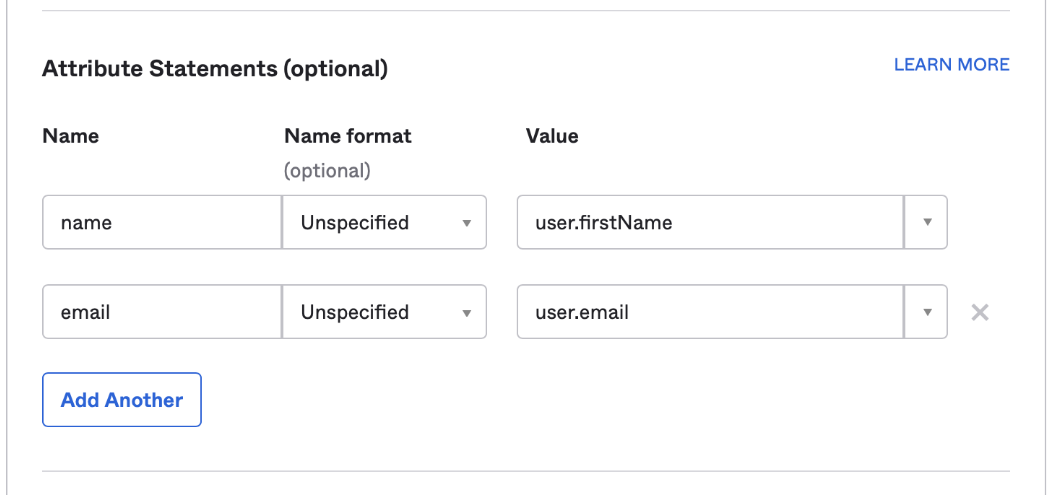
### String Filter Operators

| Operator | Value Type   | Description                                                   |
| -------- | ------------ | ------------------------------------------------------------- |
| is       | string       | String equals                                                 |
| not      | string       | String not equals                                             |
| empty    | empty string | Value is NULL                                                 |
| notEmpty | empty string | Value is not NULL                                             |
| nct      | string       | String Not contains                                           |
| like     | string       | String contains                                               |
| sw       | string       | String starts with                                            |
| ew       | string       | String ends with                                              |
| in       | string\[]    | String equals any of the given array of strings               |
| nin      | string\[]    | String not equals any of the given array of strings           |
| hasAll   | string\[]    | String contains all of the given array of partial strings     |
| hasAny   | string\[]    | String contains any of the given array of partial strings     |
| notAny   | string\[]    | String not contains any of the given array of partial strings |

### Number Filter

Number filter can be used to filter attributes of the following types `Decimal`, `Double`, `Integer` & `Percent`
e.g. `{attributeCode: {operator: value}}`

### Number Filter Operators

| Operator | Value Type     | Description                                         |
| -------- | -------------- | --------------------------------------------------- |
| eq       | number         | Number equals                                       |
| ne       | number         | Number not equals                                   |
| null     | 1 - any number | Value is NULL                                       |
| notNull  | 1 - any number | Value is not NULL                                   |
| gt       | number         | Number greater than the given number                |
| gte      | number         | Number greater than or equals to the given number   |
| lt       | number         | Number less than the given number                   |
| lte      | number         | Number less than or equals to the given number      |
| in       | number\[]      | Number equals any of the given array of numbers     |
| nin      | number\[]      | Number not equals any of the given array of numbers |
| bn       | number\[]      | Number between the given set of two numbers         |

### Date Filter

Date filter can be used to filter attributes of the following types `Date` & `DateTime`. All date filter values must be of ISO date format e.g. `2020-11-30T23:59:59.999Z`

e.g. `{attributeCode: {operator: value}}`

### Date Filter Operators

| Operator    | Value Type     | Description                             |
| ----------- | -------------- | --------------------------------------- |
| on          | date string    | Date is on the given date               |
| notOn       | date string    | Date is not on the given date           |
| empty       | empty string   | Value is NULL                           |
| notEmpty    | empty string   | Value is not NULL                       |
| after       | date string    | Date is after the given date            |
| before      | date string    | Date is before the given date           |
| onOrAfter   | date string    | Date is on or after the given date      |
| onOrBefore  | date string    | Date is on or before the given date     |
| today       | empty string   | Date is today                           |
| yesterday   | empty string   | Date is yesterday                       |
| last7days   | empty string   | Date is in the last 7 days              |
| last14days  | empty string   | Date is in the last 14 days             |
| last28days  | empty string   | Date is in the last 28 days             |
| thisWeek    | empty string   | Date falls in the current week          |
| thisMonth   | empty string   | Date falls in the current month         |
| thisQuarter | empty string   | Date falls in the current quarter       |
| thisYear    | empty string   | Date falls in the current year          |
| bn          | date string\[] | Date between the given set of two dates |

## Nested Filters

### allOf Filter

Use this to match all of the given filters. Similar to AND clause in SQL.

e.g. `{allOf: Filters<T>}`

### anyOf Filter

Use this to match any one of the given filters. Similar to OR clause in SQL.

e.g. `{anyOf: Filters<T>}`

### noneOf Filter

Use this to exclude all rows that matches any of the given filters. Similar to NOT(OR) clause in SQL.

e.g. `{noneOf: Filters<T>}`


# Post

Insert, Update & Delete one or more rows into the database

## /v1/api

<mark style="color:green;">`POST`</mark> `https://next.cloudio.io/v1/api`

This endpoint allows you to perform insert, update & delete operations against one or more data sources

#### Query Parameters

| Name | Type   | Description              |
| ---- | ------ | ------------------------ |
| csrf | string | Auth response csrf value |

#### Headers

| Name           | Type   | Description                                                         |
| -------------- | ------ | ------------------------------------------------------------------- |
| Authentication | string | <p>Authentication token<br>JS e.g. `Bearer ${authResponse.jwt}`</p> |

#### Request Body

| Name         | Type   | Description                                          |
| ------------ | ------ | ---------------------------------------------------- |
| JSON Payload | string | See below for the structure/type of the body payload |

{% tabs %}
{% tab title="200 Rows successfully retrieved" %}

```javascript
{
  "status": "OK",
  "data": {
    "EmployeesAlias": {
      "data": [
        {
          "active": "Y",
          "createdBy": "userName",
          "creationDate": "2021-05-30T04:19:41.483732Z",
          "empId": 1004,
          "gender": "X",
          "lastUpdateDate": "2021-05-30T04:19:41.483732Z",
          "lastUpdatedBy": "userName",
          "name": "name value",
          "salary": 1,
          "_rs": "Q"
        }
      ],
    }
  }
}
```

{% endtab %}

{% tab title="400 Could not execute this query." %}

```
{
  "code": 400,
  "status": "ERROR",
  "title": "Invalid Request",
  "message": "reason for the error"
}
```

{% endtab %}
{% endtabs %}

## Sample Payloads

```javascript
{
    "EmployeesAlias": {
        "ds": "Employees",
        "data": [
            {
                "_rs": "I",
                "active": "Y",
                "gender": "X",
                "name": "name value",
                "salary": 1
            }
        ]
    }
}
```

```javascript
{
  "EmployeesAlias": {
    "ds": "Employees",
    "data": [
      { "_rs": "I", "name": "Steve" },
      { "_rs": "U", "empId": 999, ..., "lastUpdateDate": "2020-11-30T23:59:59.999Z" },
      { "_rs": "D", "empId": 123, ..., "lastUpdateDate": "2020-11-30T23:59:59.999Z" },
    ]
  }
}
```

#### Record Status \`\_rs\`

Every row must include a record status `_rs`. A value of `I` `U` & `D` indicates that the row must be inserted, updated & deleted respectively. Rows with `U` and `D` must accompany with all the primary key attributes & WHO columns, especially `lastUpdateDate` attribute.

#### Response: Record Status & WHO Columns

After successful post, all the records that are part of the request will be returned back with a records status of `Q` indicating Query status. Also, all the WHO columns (`createdBy`, `creationDate`, `lastUpdatedBy` & `lastUpdateDate`) will be populated with the current authenticated userName & server datetime values. Also the values may have changed by any pre and post insert/update scripts.

{% hint style="warning" %}
Note: The order of the rows in the response is not guaranteed to be in the same order as the request.
{% endhint %}

{% hint style="info" %}
Note: Any value passed for a non-updatable attribute will be ignored. The whole request will be rejected if any of attribute passed is not defined.
{% endhint %}


# Status

## Status

<mark style="color:blue;">`GET`</mark> `https://next.cloudio.io/v1/status`

This endpoint allows you to get current status of the server that can be used for health checks.

{% tabs %}
{% tab title="200 " %}

```javascript
{
  "dbStatus": {
    "active": 0,
    "connectionErrors": 0,
    "doneWaitingCount": 25070,
    "totalFetchRowCount": 110196,
    "totalPostCount": 18641,
    "totalPostRowCount": 18745,
    "totalQueryCount": 10579,
    "waiting": 0,
    "waitingCount": 25070,
    "processStats": {
      "cpuTimeUser": {
        "secs": 4511,
        "nanos": 470000000
      },
      "cpuTimeKernel": {
        "secs": 575,
        "nanos": 460000000
      },
      "memoryUsageBytes": 281223168
    }
  },
  "runningRequests": 0,
  "status": "OK",
  "totalRequests": 117,
  "upTime": "6 days 12 hours 38 minutes ago",
  "wsStatus": {
    "active": 0,
    "connectCount": 179,
    "disconnectCount": 179,
    "enterCount": 3124,
    "exitCount": 2626,
    "kafkaDisconnectCount": 179,
    "totalRequests": 10651,
    "totalSessions": 0,
    "totalUsers": 0,
    "totalDevelopers": 0
  },
  "jsStatus": {
    "active": 0,
    "contexts": []
  }
}
```

{% endtab %}
{% endtabs %}


# API Playground

API Playground can be used to explore all the APIs assigned to all the roles that are assigned to the signed in user across all applications. Developers can use the playground to view the API specification and can perform query and post requests from within the playground. One can also download Postman collection for a selected API if he/she chose to use Postman for test invoking the API.

![Sign In Screen](/files/-MavgIf2v2iXevY5mj9S)

![API Specification Screen](/files/-Mavgd9UgBx9Gs1dRNRH)

![API Request & Response](/files/-Mavhfw2fz0ouw9KTOBO)


# Introduction

About Workflow REST APIs

Workflow REST APIs can only be invoked from within a running workflow instance. It is secured by a token and the workflow node instance status. These APIs can only be invoked when the node instance is in the `Running` status.

![Sample Workflow Instance View](/files/-Mavfw18xP4G-wcty328)


# PUT

## Workflow PUT

<mark style="color:green;">`POST`</mark> `https://next.cloudio.io/v1/wf/put`

This endpoint allows you to store key/value pair at the workflow level from within the task at execution time.

#### Request Body

| Name        | Type   | Description                                  |
| ----------- | ------ | -------------------------------------------- |
| wfUid       | string | Workflow UID                                 |
| wfInstUid   | string | Workflow Instance UID                        |
| version     | string | Workflow Version                             |
| token       | string | The token value passed to the task request   |
| nodeUid     | string | Node UID that was passed to the task request |
| executionId | string | Execution Id passed to the task request      |
| key         | string | A unique key within the workflow             |
| value       | object | The value that you want to store             |

{% tabs %}
{% tab title="200 Value successfully stored." %}

```javascript
{
    "status": "OK",    
}
```

{% endtab %}

{% tab title="403 Could not validate the provided token" %}

```javascript
{
    "status": "ERROR",
    "code": 403,
    "title": "Invalid Request",
    "message": "Invalid token: `a5bac5cb-b312-4038-b06f-e58a54ce56a`!"
}
```

{% endtab %}
{% endtabs %}


# GET

## Workflow GET

<mark style="color:green;">`POST`</mark> `https://next.cloudio.io/v1/wf/get`

This endpoint allows you to retrieve the value of a key at the workflow level from within the task at execution time.

#### Request Body

| Name        | Type   | Description                                  |
| ----------- | ------ | -------------------------------------------- |
| wfUid       | string | Workflow UID                                 |
| wfInstUid   | string | Workflow Instance UID                        |
| version     | string | Workflow Version                             |
| token       | string | The token value passed to the task request   |
| nodeUid     | string | Node UID that was passed to the task request |
| executionId | string | Execution Id passed to the task request      |
| key         | string | A unique key within the workflow             |

{% tabs %}
{% tab title="200 Value successfully retrieved." %}

```javascript
{
    "status": "OK",
    "value": "some value"
}
```

{% endtab %}

{% tab title="403 Could not validate the provided token" %}

```javascript
{
    "status": "ERROR",
    "code": 403,
    "title": "Invalid Request",
    "message": "Invalid token: `a5bac5cb-b312-4038-b06f-e58a54ce56a`!"
}
```

{% endtab %}
{% endtabs %}


# Instance PUT

## Workflow Instance PUT

<mark style="color:green;">`POST`</mark> `https://next.cloudio.io/v1/wf/instancePut`

This endpoint allows you to store key/value pair at the workflow instance level from within the task at execution time.

#### Request Body

| Name        | Type   | Description                                  |
| ----------- | ------ | -------------------------------------------- |
| wfUid       | string | Workflow UID                                 |
| wfInstUid   | string | Workflow Instance UID                        |
| version     | string | Workflow Version                             |
| token       | string | The token value passed to the task request   |
| nodeUid     | string | Node UID that was passed to the task request |
| executionId | string | Execution Id passed to the task request      |
| key         | string | A unique key within the workflow instance    |
| value       | object | The value that you want to store             |

{% tabs %}
{% tab title="200 Value successfully stored." %}

```javascript
{
    "status": "OK",    
}
```

{% endtab %}

{% tab title="403 Could not validate the provided token" %}

```javascript
{
    "status": "ERROR",
    "code": 403,
    "title": "Invalid Request",
    "message": "Invalid token: `a5bac5cb-b312-4038-b06f-e58a54ce56a`!"
}
```

{% endtab %}
{% endtabs %}


# Instance GET

## Workflow Instance GET

<mark style="color:green;">`POST`</mark> `https://next.cloudio.io/v1/wf/instanceGet`

This endpoint allows you to retrieve a value of a given key at the workflow instance level from within the task at execution time.

#### Request Body

| Name        | Type   | Description                                  |
| ----------- | ------ | -------------------------------------------- |
| wfUid       | string | Workflow UID                                 |
| wfInstUid   | string | Workflow Instance UID                        |
| version     | string | Workflow Version                             |
| token       | string | The token value passed to the task request   |
| nodeUid     | string | Node UID that was passed to the task request |
| executionId | string | Execution Id passed to the task request      |
| key         | string | A unique key within the workflow instance    |

{% tabs %}
{% tab title="200 Value successfully stored." %}

```javascript
{
    "status": "OK",    
}
```

{% endtab %}

{% tab title="403 Could not validate the provided token" %}

```javascript
{
    "status": "ERROR",
    "code": 403,
    "title": "Invalid Request",
    "message": "Invalid token: `a5bac5cb-b312-4038-b06f-e58a54ce56a`!"
}
```

{% endtab %}
{% endtabs %}


# Increment and GET

## Increment and GET

<mark style="color:green;">`POST`</mark> `https://next.cloudio.io/v1/wf/incrementAndGet`

This endpoint allows you to increment and retrieve a number value for a given key at the workflow level. A value of number 1 will be set and retrieved when a given key doesn't exists.

#### Request Body

| Name        | Type   | Description                                  |
| ----------- | ------ | -------------------------------------------- |
| wfUid       | string | Workflow UID                                 |
| wfInstUid   | string | Workflow Instance UID                        |
| version     | string | Workflow Version                             |
| token       | string | The token value passed to the task request   |
| nodeUid     | string | Node UID that was passed to the task request |
| executionId | string | Execution Id passed to the task request      |
| key         | string | A unique key within the workflow             |

{% tabs %}
{% tab title="200 Value successfully stored." %}

```javascript
{
    "status": "OK",    
}
```

{% endtab %}

{% tab title="403 Could not validate the provided token" %}

```javascript
{
    "status": "ERROR",
    "code": 403,
    "title": "Invalid Request",
    "message": "Invalid token: `a5bac5cb-b312-4038-b06f-e58a54ce56a`!"
}
```

{% endtab %}
{% endtabs %}


# Instance Increment and GET

## Instance increment and GET

<mark style="color:green;">`POST`</mark> `https://next.cloudio.io/v1/wf/instanceIncrementAndGet`

This endpoint allows you to increment and retrieve a number value for a given key at the workflow instance level. A value of number 1 will be set and retrieved when a given key doesn't exists.

#### Request Body

| Name        | Type   | Description                                  |
| ----------- | ------ | -------------------------------------------- |
| wfUid       | string | Workflow UID                                 |
| wfInstUid   | string | Workflow Instance UID                        |
| version     | string | Workflow Version                             |
| token       | string | The token value passed to the task request   |
| nodeUid     | string | Node UID that was passed to the task request |
| executionId | string | Execution Id passed to the task request      |
| key         | string | A unique key within the workflow instance    |

{% tabs %}
{% tab title="200 Value successfully stored." %}

```javascript
{
    "status": "OK",    
}
```

{% endtab %}

{% tab title="403 Could not validate the provided token" %}

```javascript
{
    "status": "ERROR",
    "code": 403,
    "title": "Invalid Request",
    "message": "Invalid token: `a5bac5cb-b312-4038-b06f-e58a54ce56a`!"
}
```

{% endtab %}
{% endtabs %}


# CloudIO CLI

All in one binary ✨

![](/files/-MfK1hXTQET2ayuCsLEG)

The CLI can be used for the following purposes

* Launching one or more services (API, Scheduler, Workflow Engine)
* Generating Application patch
* Verifying an existing patch against an instance to check the differences
* Applying SQL migrations and Application patch
* Clearing redis cache
* Encrypting environment variables


# Patch Management

### Creating an Application Patch

```bash
$ cloudio create-patch -a my-app
```

Running the above command generates an application patch as a zip file. The zip contains all the metadata in various .json & .js files. You can extract and check into your source control system e.g. GitHub.

![](/files/-MfKIlAfUUhUtvmTin5v)

> Example Output

![](/files/-MfKIXZHMYQX2s2RMACb)

### Verifying an Application Patch

Once a patch is generated from a source instance, you can verify it against a target instance to review the changes to be applied to the target instance.

```bash
$ cloudio verify-patch -a my-app
```

![](/files/-MfKT-_5axEdOjTi9Qzg)

### Applying an Application Patch

Once reviewed and approved, you can apply the patch using the following command

```bash
$ cloudio patch -a my-app
```

![](/files/-MfKTS3v2Ve7ld__XhuG)

{% hint style="info" %}
You must authenticate with a user having a `Patch Administrator` role assigned to perform the above operations.
{% endhint %}


# SQL Migrations

Database changes can be automatically deployed during server startup or on demand using CloudIO CLI.

SQL scripts must be named in `io_YYYYMMDDHHmmss_some_description.sql` format and placed under the respective application migration folder. Any metadata scripts that create or alter the metadata tables in cloudio schema must be placed under `cloudio` folder.

{% hint style="warning" %}
Note: File name must be unique. Once migrated any further changes to the script will be ignored.
{% endhint %}


# Email Setup

### SMTP Setup

Add below environment variables to configure the SMTP email server

```properties
EMAIL_PROVIDER=SMTP
SMTP_HOST=smtp.domain.com
SMTP_FROM=noreply@domain.com
SMTP_USERNAME=noreply@domain.com
SMTP_PASSWORD=******************
```

{% hint style="warning" %}
Use the below settings if your SMTP doesn't support TLS and/or doesn't require authentication
{% endhint %}

```properties
EMAIL_PROVIDER=SMTP
SMTP_USE_TLS=false
SMTP_HOST=smtp.domain.com
SMTP_FROM=noreply@domain.com
SMTP_PORT=25
```

### Gmail OAuth Setup

To set up a Gmail OAuth for emails, you need to have a GSuite admin user, and with a personal Gmail account setup cannot be done. Please follow the steps below to create Service Account

* Go to [Google Developer Console](https://console.cloud.google.com/)
* Click APIs & Services > Credentials.
* Click Create Credentials > Service account.
* For the Service account name, enter a name for the service account.
* (Optional) For the Service account description, enter a description of the service account.
* Click Create and Continue.
* Click Done > Save.
* At the top, click Keys > Add Key > Create new key.
* Make sure the key type is set to JSON and click Create.
* You'll get a message that the service account's private key JSON file was downloaded to your computer. Make a note of the file name and where your browser saves it. You'll need it later.
* Click Close.

#### Domain-wide access delegation for a Service Account

* In your Google Admin console (at admin.google.com)
* Go to Menu Security > Access and data control > API controls.
* Click Manage Domain Wide Delegation.
* Click Add new and enter your service account client ID.
* You can find the ID (also known as the Unique ID) in the JSON file that you downloaded when you created the service account or in Google Cloud (click IAM & AdminService accounts the name of your service account).
* Enter the client ID of the service account or the OAuth2 client ID of the app. (Typically, the ID is provided by the developer. If you're the owner of the service account, you can look up the ID.)
* In OAuth Scopes, add each scope that the application can access (should be appropriately narrow). You can use any of the OAuth 2.0 Scopes for Google APIs.
* Please add the following Gmail API scopes,
  * `https://www.googleapis.com/auth/gmail.send`
  * `https://www.googleapis.com/auth/gmail.compose`
  * `https://www.googleapis.com/auth/gmail.readonly`
  * `https://mail.google.com/`
  * `https://www.googleapis.com/auth/gmail.modify`
* Click Authorize. If you get an error, the client ID might not be registered with Google or there might be duplicate or unsupported scopes.
* Point to the new client ID, click View details and make sure every scope is listed. If a scope is not listed, click Edit, enter the missing scope, and click Authorize. You can't edit the client ID.
* **Please make the following changes to CloudIO env file**
  * EMAIL\_PROVIDER=GMAIL
  * GMAIL\_CREDENTIAL\_FILE\_PATH = {{path\_to\_file}}/serviceaccount.json
  * SMTP\_HOST=smtp.gmail.com
  * SMTP\_USERNAME=<noreply@domain.com>
  * SMTP\_FROM=<noreply@domain.com>
* **Place the downloaded JSON credentials file into the server path and configure the path for GMAIL\_CREDENTIAL\_FILE\_PATH param**


# Configure SSO/OAuth

Any system that supports OAuth, SAML, can be used with CloudIO to configure SSO.

{% content-ref url="/pages/NAYQ2lhdpObiSfpni9rQ" %}
[OAUTH 2.0](/app-deployment/configure-sso/oauth)
{% endcontent-ref %}

{% content-ref url="/pages/E3rgluYcXHeYkaJgLg05" %}
[SAML](/app-deployment/configure-sso/saml)
{% endcontent-ref %}


# OAUTH 2.0

{% content-ref url="/pages/zUPVlnc0SPq5Q49WWb18" %}
[GOOGLE](/app-deployment/configure-sso/oauth/oauth)
{% endcontent-ref %}


# GOOGLE

**Step 1 - Configure Google API Console**

* Go to <https://console.developers.google.com/> and sign up/log in.
* Click on **Select Project** to create a new Google Apps Project, you will see a popup with the list of all your projects.

  <figure><img src="/files/Ij2yPLfdaaxdfEEhcIof" alt=""><figcaption></figcaption></figure>
* You can click on the New Project button to create a **New project**.

  <figure><img src="/files/lPbfQT402fFV03HxMNxe" alt=""><figcaption></figcaption></figure>
* Enter your Project name under the **Project Name** field and click on Create.

  <figure><img src="/files/Vb9aGRxWCpRJ1Te08oqw" alt=""><figcaption></figcaption></figure>
* Go to **Navigation Menu -> APIs -> Services -> Credentials.**

  <figure><img src="/files/mFaPMtDSLf4nFp5vAHZX" alt=""><figcaption></figcaption></figure>
* Click the Create Credentials button and select **OAuth Client ID** from the options provided.

  <figure><img src="/files/dkEE9xBVjH7bsq8EA2TB" alt=""><figcaption></figcaption></figure>
* In case you are facing some warning saying that in order to create an OAuth Client ID, you must set a product name on the consent screen (as shown in the below image). Click on the **Configure consent screen** button.

  <figure><img src="/files/lL14nyZIRlSN4D3Sacp6" alt=""><figcaption></figcaption></figure>
* Choose how you want to configure and register your app and click on **Create** button.

  <figure><img src="/files/UwtE2j47LTcWkyAqz4wG" alt=""><figcaption></figcaption></figure>
* Enter the required details such as **App Name**, and **User Support Email**. and click on the **Save and Continue** buttons.

  <figure><img src="/files/HGFHrkIzYPmT5yp5U5Ho" alt=""><figcaption></figcaption></figure>

  <figure><img src="/files/KZHgdCFUpbg5mbrXo85u" alt=""><figcaption></figcaption></figure>
* Now for configuring scopes, click on **Add or Remove the Scopes** button.

  <figure><img src="/files/wzqkaaOp0ileNBjdm9BJ" alt=""><figcaption></figcaption></figure>
* Now, Select the Scopes to allow your project to access specific types of private user data from their Google Account and click on the Update button.

  <figure><img src="/files/jlBtRe1lEfR2zrb3n7xj" alt=""><figcaption></figcaption></figure>
* Go to the Credentials tab and click on Create Credentials button. Select **Web Application** from the dropdown list to create a new application.

  <figure><img src="/files/MKpbrlQ4Ify71GefTSCF" alt=""><figcaption></figcaption></figure>
* Enter the name you want for your Client ID under the **Name** field and enter the **Authorized Redirect URIs** field and click on Create button.

  <figure><img src="/files/bSnpxHlkYHy4afRMphqQ" alt=""><figcaption></figcaption></figure>
* You will see a popup with the **Client ID** and **Client Secret,** Copy your Client ID and Client Secret and save it.

  <figure><img src="/files/RWNNqAGqvEt6qH84iI2g" alt=""><figcaption></figcaption></figure>

**Step 2 - Configure Google Details in CloudIO**

1. Login to CloudIO and navigate to the settings tab.

   ![](/files/zIjJgvikkaC4h0MfmF4L)
2. Select the **OAUTH** Auth provider and complete the following details.

   <figure><img src="/files/3fX2qNVkiUrkWgVfHQCW" alt=""><figcaption></figcaption></figure>


# SAML

{% content-ref url="/pages/aYQYJ2Ii2zz0zbeU6Ir0" %}
[AUTH0](/app-deployment/configure-sso/saml/auth0)
{% endcontent-ref %}

{% content-ref url="/pages/7IAspiBR17eTbw8Je0Xm" %}
[AZURE AD](/app-deployment/configure-sso/saml/azure-ad)
{% endcontent-ref %}

{% content-ref url="/pages/hAxHzXnvmmaf4FASqO1Q" %}
[OKTA](/app-deployment/configure-sso/saml/saml-okta)
{% endcontent-ref %}


# AUTH0

#### Step 1 - Configure SSO in AUTH0

* Log in to AUTH0 developer console <https://developer.auth0.com/>.&#x20;
* Go to Dashboard > Applications > Applications and create a new application.

  <figure><img src="/files/q1DyvKFBwZV44zKmW0vZ" alt=""><figcaption></figcaption></figure>
* Provide a name and select Requalr Web Application. Click on Create button to create a new application.

  <figure><img src="/files/tpnWXbMfSD1QJrleMv9N" alt=""><figcaption></figcaption></figure>
* Select the Addons tab.

  <figure><img src="/files/o14B0TQFlgiIFvzdMrDi" alt=""><figcaption></figcaption></figure>
* Enable the SAML2 Web App toggle.

  <figure><img src="/files/qaJ5MZFtTLcvpvwdtXbS" alt=""><figcaption></figcaption></figure>
* On the Settings tab, enter the Application Callback URL to which the SAML assertions should be sent after Auth0 has authenticated the user(Replace this with your actual URL). Copy the **nameIdentifierProbes** for name and email. Scroll to the bottom of the tab and click Enable.

  <figure><img src="/files/isZh7DHOlgKLI9XBvx51" alt=""><figcaption></figcaption></figure>

  <figure><img src="/files/qjEoWVPQIUEDswn0G7Bf" alt=""><figcaption></figcaption></figure>
* Click on the Usage tab to view the information that you need to configure the service provider application. Copy the issuer, Identity Provider Login UR&#x4C;**,** and download Identity Provider Metadata.

  <figure><img src="/files/DTBgD9h3JYd9WiC1e0z5" alt=""><figcaption></figcaption></figure>

#### **Step 2 - Configure AUTH0 Details in CloudIO**

* Login to CloudIO and navigate to the settings tab

  ![](/files/zIjJgvikkaC4h0MfmF4L)
* Select SAML Auth provider and configure the below details from Step 1

  <figure><img src="/files/CQ4Zakg6kucYhc9KCQAL" alt=""><figcaption></figcaption></figure>


# AZURE AD

#### Step 1 - Configure SSO in AZURE AD

* Log in to the Azure portal.
* Go to Enterprise Applications and click Add a New Application, and then click on Create your own application.

  <figure><img src="/files/MtwdT1QF3zBuWupdmvPD" alt=""><figcaption></figcaption></figure>

  <figure><img src="/files/7bA5Hq5i5WLetgDp5Gqw" alt=""><figcaption></figcaption></figure>
* Set the app name you want, and check the `Integrate any other application you don't find in the gallery` option, and click on Create.

  <figure><img src="/files/FfW1pvZKbkIuinZnzMFz" alt=""><figcaption></figcaption></figure>
* On the Applications Overview page, click on the Set up single sign-on card then choose SAML as the single sign-on method.

  <figure><img src="/files/Y67INAxsHlMQqbNapxH8" alt=""><figcaption></figcaption></figure>
* On the `Basic SAML Configuration` section, enter the identifier and reply URL, and click on `Save`.
  * **Identifier (Entity ID)**
  * **Reply URL (Assertion Consumer Service URL)**

    <figure><img src="/files/6kDwLZ3RKEgstBYW5bp8" alt=""><figcaption></figcaption></figure>

    <figure><img src="/files/a9FQPEXTHylcz9yGXDCb" alt=""><figcaption></figcaption></figure>
* On the Attributes & Claims section, click on the Edit link.

  <figure><img src="/files/jItLbk83EkLcEG0kf2HA" alt=""><figcaption></figcaption></figure>
* Copy the name and email claim attribute names.

  <figure><img src="/files/H8LGzpOx6WTxO11IiJAo" alt=""><figcaption></figcaption></figure>
* On the SAML Signing Certificate and Setup sections, download the Federation Metadata XML and copy the Login URL to be used on the CloudIO Setup page.

  <figure><img src="/files/owJhbw0aDc738CKkfwcF" alt=""><figcaption></figcaption></figure>
* Go to Users and Groups on the left side menu to assign the users or groups that should have access to CloudIO.

  <figure><img src="/files/y9wRovUuhXXmFU2FKgzT" alt=""><figcaption></figcaption></figure>

#### **Step 2 - Configure Azure SSO in CloudIO**

* Login to CloudIO and navigate to the settings tab.

  ![](/files/zIjJgvikkaC4h0MfmF4L)
* Select SAML Auth provider and configure the below details from Step 1

  <figure><img src="/files/oF36GrgYm3VGnkLBWOx9" alt=""><figcaption></figcaption></figure>

\ <br>

#### &#x20;<br>


# OKTA

**Step 1 - Configure OKTA App**

1. Log in to Okta Developer Console
2. On the New App Integration wizard, select SAML 2.0.

   <figure><img src="https://user-images.githubusercontent.com/8475899/230389494-e9633227-6e09-44cd-a2ea-1f360a7e5c94.png" alt=""><figcaption></figcaption></figure>
3. Set a name.

   <figure><img src="https://user-images.githubusercontent.com/8475899/230389786-d2a41e74-2357-4c83-8253-6c59b2a45e1a.png" alt=""><figcaption></figcaption></figure>
4. Add the Single sign-on URL and Audience URI. (Unique Identifier)

   <figure><img src="/files/LFiAv0JIP2uJCq05ib55" alt=""><figcaption></figcaption></figure>
5. Define the Attribute Statements. Okta says this is optional, but we need to set up these attributes to get access to the user's name and email when they authenticate on CloudIO.

   <figure><img src="https://user-images.githubusercontent.com/8475899/230392001-092954c5-ba10-43e4-b0b5-b2152a9ab8e0.png" alt=""><figcaption></figcaption></figure>
6. Mark the App Integration as internal.

   <figure><img src="https://user-images.githubusercontent.com/8475899/230392260-719b6229-9b90-4cf9-9faf-3af1a2667493.png" alt=""><figcaption></figcaption></figure>
7. The App Integration was created and we need to retrieve IDP Metadata to finish the setup on CloudIO. Scroll down, and click on the View SAML setup instructions link. Copy the IDP metadata.

   <figure><img src="https://user-images.githubusercontent.com/8475899/230393244-1fa59839-551d-46bb-ad83-447b946059be.png" alt=""><figcaption></figcaption></figure>
8. Assign users/groups that can use the app, otherwise, they won’t be able to get authenticated through it.

   <figure><img src="https://user-images.githubusercontent.com/8475899/230394723-b92c4f6b-092a-4d49-b373-4b13f6052660.png" alt=""><figcaption></figcaption></figure>

#### **Step 2 - Configure OKTA Details in CloudIO**

1. Login to CloudIO and navigate to the settings tab.

   <figure><img src="/files/zIjJgvikkaC4h0MfmF4L" alt=""><figcaption></figcaption></figure>
2. Select SAML Auth provider and configure the below details from Step 1

   <figure><img src="/files/tYylM21oW2Qy3YwXLhE8" alt=""><figcaption></figcaption></figure>


# Auto User Creation

Once SSO is configured, new users won't be able to access the CloudIO application, even after successful authentication, until the user account with the same SSO username is created within CloudIO.

You could automate the process of user account creation in CloudIO by implementing the following cloud function under the `cloudio` app.

{% hint style="info" %}
The function must be defined in the **cloudio** app with Module URI **`create-user`** that exports a named function **`createUser`**.
{% endhint %}

<figure><img src="/files/iae9aOQvEOCXH6bq1qGV" alt=""><figcaption></figcaption></figure>

{% code title="create-user function" overflow="wrap" lineNumbers="true" %}

```typescript
import { IoUserRolesEdit, NewRow } from "@cloudio-saas/datasource-types";

async function createUser({ userName, displayName, emailAddress }) {

    // validate if the userName/emailAddress is allowed to sign-in
    if (!emailAddress.endsWith('@example-domain.com')) {
        throw new UserError(`Email ${emailAddress} is not allowed to sign-in!`);
    }

    let appRoles: Record<string, string[]> = {};

    /*
        // get all the roles by app, that are to be assigned to this userName

        // fetch from a REST API
        const resp = await db.fetch('https://get-user-roles');
        appRoles = resp.json();

        // or fetch from a database table
        const rows = await db.executeQuery('select app_uid `appUid`, role_uid `roleUid` from approved_roles where user_name = ?', [userName]);
        appRoles = rows.reduce((pv, row) => {
            const { appUid, roleUid } = row;
            let roles = pv[appUid];
            if (!roles) {
                roles = [];
                pv[appUid] = roles;
            }
            if (!roles.includes(roleUid)) {
                roles.push(roleUid);
            }
            return pv;
        }, {} as Record<string, string[]>);

        // or hardcode it
        appRoles = {
            cloudio: ['administrator', 'developer', 'patch_administrator'],
            'my-app': ['administrator', 'developer', 'patch_administrator']
        };
    */

    const startDate = new Date();
    startDate.setHours(0, 0, 0, 0);

    // create a user account with the given userName & emailAddress
    await db.insertOne('IoUsers',
        { userName, displayName, emailAddress, startDate }
    );

    let userRoles: NewRow<IoUserRolesEdit>[] = [];
    let seqNo = 0;
    const apps = Object.keys(appRoles);
    for (let i = 0; i < apps.length; i++) {
        const appUid = apps[i];
        const roleCodes = appRoles[appUid];
        roleCodes.forEach((roleUid) => {
            seqNo += 10;
            userRoles.push({
                appUid,
                userName,
                roleUid,
                seqNo,
                startDate,
            });
        });
    }

    // assign roles to the user
    await db.insertMany('IoUserRolesEdit', userRoles);
}

export { createUser };
```

{% endcode %}

Use the following patch to upload the above sample function in cloudio app.

{% file src="/files/65Mmvz7VKKCjgLAVrvkV" %}


# Test Automation

CloudIO Platform comes with an inbuilt test automation framework. You can create test scripts to automate the testing of both backend services & frontend UI interactions. Test scripts are written in JavaScript and can be auto-generated via. recording.

<figure><img src="/files/1MBfg6GrAnffn3IdcmR4" alt=""><figcaption><p>Test Automcation In Action</p></figcaption></figure>

The test scripts are similar to Jest with chaijs assertions.

{% code title="Sample Backend Test Script" overflow="wrap" lineNumbers="true" %}

```javascript
/* refer https://www.chaijs.com/api/bdd/ for more assertions */

beforeAll(async () => {
    platform.showInfo("Before all...");
});

afterAll(async () => {
    platform.showInfo("After all...");
});

beforeEach(async () => {
    platform.showInfo("Before each...");
});

afterEach(async () => {
    platform.showInfo("After each...");
});

test("Query Test", async () => {
    // const rows = await find('Todos', { "filter": [], "limit": 2000, "offset": 0, "sort": { "id": 1 } });
    // expect(rows.length).to.gt(0);
    expect(1 + 1).to.eq(2);
});

test("Insert Test", async () => {
    // const input = [{ "completed": "N", "fileUid": "01G2T3JJAREESW47ZYTHX43ZPG", "todo": "test test" }];
    // const rows = await insertMany('Todos', input);
    // expect(rows[0].lastUpdateDate).to.not.empty;
    expect(1 + 1).to.eq(2);
});

test("Dummy Test", async () => {
    // refer https://www.chaijs.com/api/bdd/ for more assertions
    expect(1 + 1).to.eq(2);
});

/*
Find below the typescript definition for all the inbuilt functions available along with the standard ES2020 JavaScript


    import { WSRequest, WSSuccessResponse, AllDatasources, Query, DBRow } from '@cloudio-saas/datasource-types';
    import { Platform, UIDriver, MultiPostFunction, SinglePostFunction, TestFn, FnWithResult, FnWithResults, TestResult, SQLResult } from 'cloudio';
    type DataSourceName = keyof AllDatasources;
    declare global {
      const platform: Platform;    
      const ui: UIDriver;
      const expect: Chai.ExpectStatic;
      declare function test(name: string, fn: TestFn): void;
      declare function beforeAll(fn: TestFn): void;
      declare function afterAll(fn: FnWithResults): void;
      declare function beforeEach(fn: TestFn): void;
      declare function afterEach(fn: FnWithResult): void;
      declare function post(request: WSRequest, appUid: string): Promise<WSSuccessResponse<any>>;
      declare function find<T extends DataSourceName>(ds: T, request: Query<AllDatasources[T]>): Promise<DBRow<AllDatasources[T]>[]>;      
      const insertMany = MultiPostFunction;
      const updateMany = MultiPostFunction;
      const deleteMany = MultiPostFunction;
      const insertOne = SinglePostFunction;
      const updateOne = SinglePostFunction;
      const deleteOne = SinglePostFunction;
      declare function executeQuery(sql: string): Promise<SQLType>;
      declare function executeUpdate(sql: string): Promise<SQLType>;
    }

*/

```

{% endcode %}

{% code title="Sample Frontend Test Script" overflow="wrap" lineNumbers="true" %}

```
/* refer https://www.chaijs.com/api/bdd/ for more assertions */

beforeAll(async () => {
    platform.showInfo("Before all...");
});

afterAll(async () => {
    platform.showInfo("After all...");
});

beforeEach(async () => {
    platform.showInfo("Before each...");
});

afterEach(async () => {
    platform.showInfo("After each...");
});

test("Sample UI Test", async () => {
  
  // To navigate to a page
  await ui.page('automation');
  
  // To select a tab item and ignore if it's already selected
  await ui.click('tabItem1', { skipActive: true });
  
  // To sort a column in a data grid
  await ui.gridColumnSort('stringColumn2', { direction: 'asc' });
  
  // To click a button, box, link, etc
  await ui.click('button1');
  
  // To type a text value in a string column on the 2nd row of a data grid
  await ui.type('stringColumn2', 'test', { row: 2 });
  
  // To type a number value in a number column on the 1st row of a data grid
  await ui.type('numberColumn1', 123);
  
  // To type a date value in a date column on the 1st row of a data grid
  await ui.type('dateColumn2', new Date());

  // To check a checkbox on the 1st row of a data grid
  await ui.click("checkboxColumn");

  // To group commands to be performed within a scope e.g. popup
  await ui.scope("popup", async () => {
    // These itemId's are relative to the scope's itemId
    await ui.type('select', 'XYZ');
    await ui.closePopup("popup");
  });

  // To select an option in a radio box by value (not label)
  await ui.type('radioBox', "Y");

  // To type a number value in a number column's header filter of a data grid
  await ui.typeGridHeaderFilter('numberColumn1', '123');

  // To type a smart search number filter
  await ui.typeSmartSearchFilter('smartSearch', 'Number', 'greater than', 123);

  // To check if a notification is displayed with a given message and close it
  await ui.hasNotified('Button clicked!').then(ui.close);

  // To wait for 10 seconds
  await ui.wait(10000);

  // To click any item with data-testid attribute or with a specific selector
  await ui.click({testid: 'search-entries'});

});

/*
Find below the typescript definition for all the inbuilt functions available along with the standard ES2020 JavaScript


    import { WSRequest, WSSuccessResponse, AllDatasources, Query, DBRow } from '@cloudio-saas/datasource-types';
    import { Platform, UIDriver, MultiPostFunction, SinglePostFunction, TestFn, FnWithResult, FnWithResults, TestResult, SQLResult } from 'cloudio';
    type DataSourceName = keyof AllDatasources;
    declare global {
      const platform: Platform;    
      const ui: UIDriver;
      const expect: Chai.ExpectStatic;
      declare function test(name: string, fn: TestFn): void;
      declare function beforeAll(fn: TestFn): void;
      declare function afterAll(fn: FnWithResults): void;
      declare function beforeEach(fn: TestFn): void;
      declare function afterEach(fn: FnWithResult): void;
      declare function post(request: WSRequest, appUid: string): Promise<WSSuccessResponse<any>>;
      declare function find<T extends DataSourceName>(ds: T, request: Query<AllDatasources[T]>): Promise<DBRow<AllDatasources[T]>[]>;      
      const insertMany = MultiPostFunction;
      const updateMany = MultiPostFunction;
      const deleteMany = MultiPostFunction;
      const insertOne = SinglePostFunction;
      const updateOne = SinglePostFunction;
      const deleteOne = SinglePostFunction;
      declare function executeQuery(sql: string): Promise<SQLType>;
      declare function executeUpdate(sql: string): Promise<SQLType>;
    }

*/

```

{% endcode %}

With the record option, you can generate test scripts while navigating through the application flow. Once generated, you can further finetune the script as needed.

<figure><img src="/files/goUbDmvTVnRgeLRvwzIY" alt=""><figcaption><p>Test Scripts Sidebar Tab</p></figcaption></figure>


# On Premise Agent

When modernizing or migrating your enterprise application to Cloud, there may be instances, where you may have to connect to legacy data on-premise. CloudIO On-Premise Agent enables your cloud application to connect to your legacy data behind the firewall without having to open up any inbound ports.

<figure><img src="/files/qtY9uqgB69XMshjGBPqp" alt=""><figcaption><p>On Premise Agent Architecture</p></figcaption></figure>

### How does it work?

The on-premise agent is an executable that can be configured to connect to your on-premise data that lives within your corporate firewall. Since the agent also runs within your corporate firewall it can access the data securely without having to expose any inbound port through the firewall.

You can set up an API Key & Secret for a service account on the cloud and set up the agent to use those credentials to make a secure WebSocket connection to the CloudIO Apps running on the cloud.

{% hint style="info" %}
Note: If you CloudIO Apps are also running within your corporate network, then you don't need this On-Premise Agent.
{% endhint %}

When the user performs a transaction on the app running in the browser, it makes a call to the server running on the public cloud, which intern sends the request (Query, Update) down to the on-prem agent. The on-prem agent, upon receiving the request from the server connects to the on-prem database and performs the requested actions and returns the response to the server. The server will then forward the response to the user's browser.

Multiple instances of the Agent can be run to achieve high availability and scale. Each agent would connect to one of the many server nodes, the user application running on the browser also connects to one of the server nodes and Apache Kafka is used to instantly transport the request and response messages between the server nodes. With the use of Apache Kafka & WebSockets, the request from the browser to the cloud server and down to the agent and back to the cloud and then finally send back to the browser with very low latency (less than 100ms on average).


# Setup

## Oracle Instant Client Setup

To set up the instant client to run the 4.0 with Oracle database as metadata or applications. Please download the instant client by using the below url and respective db version (we recommended to use 19 or 21 version, in future depends on the oracle db versions need to download the latest versions).

**For Linux:**  <https://www.oracle.com/database/technologies/instant-client/linux-x86-64-downloads.html>

**For Mac:** <https://www.oracle.com/database/technologies/instant-client/macos-intel-x86-downloads.html>

Please unzip the folder and make new directory with new name for Oracle Instant client home path,

`mkdir oracle_instant_client`\
`cd oracle_instant_client`

And make new directory as lib folder with in the oracle\_instant\_client home folder.,

&#x20;`mkdir lib`&#x20;

And move the instant client files into the lib folder, If the soft links are not copied or pointing right folder, please remove the soft links and create new soft links within this lib folder.

**Note:** After unzipping we are expecting all the files will be in the lib folder, so please move the files and remove previous soft links and create it again within the lib folder.

**Example to create soft links:**

`ln -s libocci.so.21.1 libocci.so.20.1`&#x20;

`ln -s libocci.so.21.1 libocci.so.19.1`

**For Linux:** Open the .bash\_profile and add the following export lines,

`export ORACLE_HOME="Instant client home path"`&#x20;

`export LD_LIBRARY_PATH="Instant client lib path"`

&#x20;                                                     OR

You can add the export *"LD\_LIBRARY\_PATH=Instant client lib path"* in the start.sh file which is located cloudio 4.o server folder.

**Example:**

`export ORACLE_HOME=$HOME/softwares/oracle_instant_client`&#x20;

`export LD_LIBRARY_PATH=$HOME/softwares/oracle_instant_client/lib`